
Overview
A media card is an aggregation of most of the information that a client application needs to be able to present a single-page view of the content.
This page explains how to retrieve media card information for content and explains how to interpret the metadata that is returned in order to display it on the screen in the most appropriate way.
Here is how the VOD media card API response maps to what is displayed (here using the ION VOD media card view as an example):
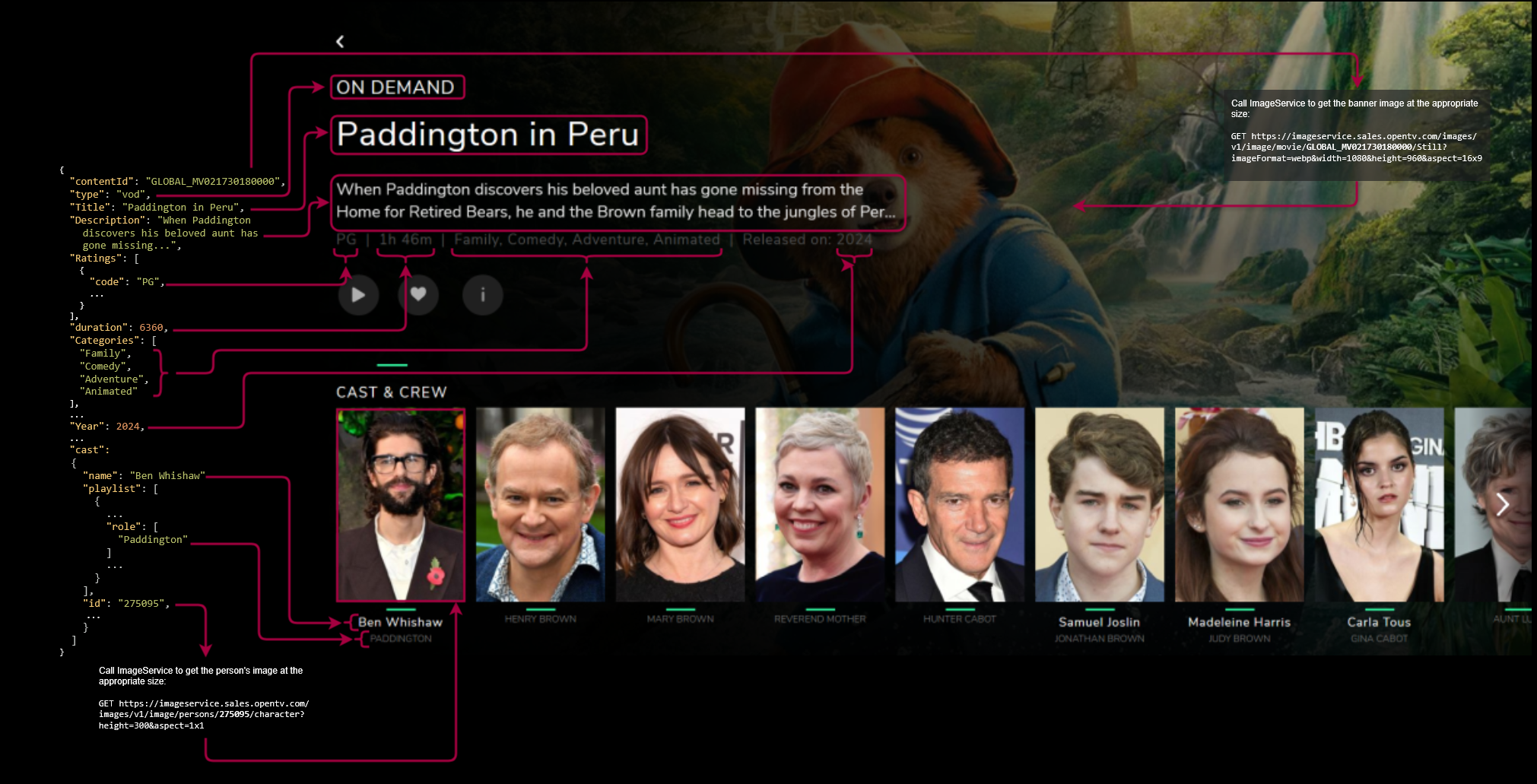
Media card types
There are different endpoints for media cards for different types of content – live programmes (events), VOD, series, and recordings.
Each of these has different content that allows them to each be presented in the most appropriate way in a client application.
In each media card type, there are variations depending on the type of content. For example:
-
An episode of a series has additional metadata that is not relevant for a movie (whether they are VOD or live)
-
For a live programme that is a sporting event, there is additional metadata that is not relevant to an episode of a series.
Images
Though a media card response usually includes links to relevant images, you are recommended to use ImageService to get images at the appropriate sizes, aspect ratios, and so on.
Requests
There are four different endpoints for the different types of content.
EPG (live)
To retrieve the media card information for a broadcast event, send a GET request to:
https://<host>:<port>/metadata/v1/epg/{id}/mediacard
The EPG response does not include catch-up metadata. Use the Content Discovery Facade catch-up endpoint to get this:
GET https://<host>:<port>/metadata/v1/catchup/{event}
VOD
To retrieve the media card information for a VOD content item, send a GET request to:
https://<host>:<port>/metadata/v1/vod/{id}/mediacard
Series
To retrieve the media card information for a series, send a GET request to:
https://<host>:<port>/metadata/v1/series/{id}/mediacard
Recordings
To retrieve the media card information for recording, send a GET request to:
https://<host>:<port>/metadata/v1/recording/{id}/mediacard
Headers
-
Authorization– bearer access token -
Cache-Control– caching rules for clients and web proxies -
Content-Encoding– the compression level of the response
Mandatory arguments
-
id– the identifier of the content/event/series/recording that the media card is for
Other arguments
All these arguments are query parameters:
-
fields– a list of field names to return in the response -
deviceType– the type of the device making the query (e.g., Android) to ensure that irrelevant results are filtered out -
Accept-Language– the language (locale) of the response data
Response
A successful request returns an HTTP 200 status.
A bad request returns an HTTP 400 status.
An unsuccessful request returns an HTTP 401 status.
The recommendations portion of the response is driven by a related recommendation based on the content. Certain parts of the response can be turned on or off through back-end configuration.
Interpreting the response
The following table lists the sections and fields that are returned in the response.
Some sections are dependent on the type for content. This is indicated in the Scope section of the table.
Note that Scope section only includes the most common contentTypes – episode/tvshow and movie.
Some blocks and fields are only relevant for other types. For example, the sportingEvent section is only present for sport-related content (sports, match, and race).
|
Field |
Description |
Scope |
||||||
|---|---|---|---|---|---|---|---|---|
|
|
|
|
|
|||||
|
|
|
|
|
|
|
|||
|
|
The ID of the content For live ( For |
✅ |
✅ |
✅ |
✅ |
✅ |
✅ |
✅ |
|
|
When an editorial content is created from an event (for catch-up or recording), this value is copied to the editorial content’s For deep linking, this specifies the ID of the same editorial content from a different content provider. If this field has a value, and if other playout variants are available for the same content, these will be available in This is only relevant in deployments that use the one-to-one event/editorial content model (the default for new deployments) |
|
|
✅ |
✅ |
✅ |
✅ |
|
|
|
The content type – one of |
✅ |
✅ |
✅ |
✅ |
✅ |
✅ |
✅ |
|
|
The title of the content |
✅ |
✅ |
✅ |
✅ |
✅ |
✅ |
✅ |
|
|
The content description |
✅ |
✅ |
✅ |
✅ |
✅ |
✅ |
✅ |
|
|
A link to the media card image |
|
|
|
|
|
|
|
|
|
The broadcast |
|
|
✅ |
✅ |
✅ |
✅ |
|
|
|
The actors |
✅ |
✅ |
✅ |
✅ |
✅ |
✅ |
|
|
|
The categories that the content belongs to |
✅ |
✅ |
✅ |
✅ |
✅ |
✅ |
|
|
|
The parental rating(s) for the content. There can be multiple ratings, one per rating body. |
✅ |
✅ |
✅ |
✅ |
✅ |
✅ |
✅ |
|
|
The ID of the broadcast event |
|
|
✅ |
✅ |
✅ |
✅ |
|
|
|
The content ID |
✅ |
✅ |
✅ |
✅ |
✅ |
✅ |
|
|
|
Whether start-over is enabled for the content/event |
|
|
✅ |
✅ |
✅ |
✅ |
|
|
|
Whether catch-up is enabled for the content/event |
|
|
✅ |
✅ |
✅ |
✅ |
|
|
|
Whether long-term catch-up (LTCU) is enabled for the content/event |
✅ |
✅ |
✅ |
✅ |
✅ |
✅ |
|
|
|
Whether short-term catch-up (STCU) is enabled for the content/event |
✅ |
✅ |
✅ |
✅ |
✅ |
✅ |
|
|
|
Whether NPVR (recording) is enabled for the content/event |
|
|
✅ |
✅ |
✅ |
✅ |
|
|
|
Details of the channel on which the event is broadcast |
|
|
✅ |
✅ |
✅ |
✅ |
|
|
|
Details of the product(s) that the content belongs to. This allows you to display the different ways that the user can purchase the content. This is an array of products that includes the following for each product:
|
✅ |
✅ |
✅ |
✅ |
✅ |
✅ |
|
|
|
The episode number within the season |
✅ |
|
✅ |
|
✅ |
|
|
|
|
The episode name |
|
|
|
|
|
|
|
|
|
The year of release |
✅ |
✅ |
✅ |
|
✅ |
|
|
|
|
The validity period of the account’s entitlement to consume the content |
✅ |
✅ |
|
|
|
|
|
|
|
For episodes, the number of the season that the episode belongs to |
✅ |
✅ (null) |
✅ |
✅ (null) |
✅ |
✅ (null) |
|
|
|
The duration of the content in minutes |
✅ |
✅ |
|
|
|
|
|
|
|
The content type – one of |
✅ |
✅ |
✅ |
✅ |
✅ |
✅ |
|
|
|
Links to the playback manifests |
✅ |
✅ |
✅ |
✅ |
✅ |
✅ |
|
|
|
Information about the available seasons and episodes for the series that the episode belongs to. |
✅ |
|
✅ |
✅ (null) |
✅ |
✅ (null) |
✅ |
|
|
If the event is a sporting event, details of the event (tournament, match time period, details of home and away teams, round, status, and so on |
|
|
✅ |
✅ |
✅ |
✅ |
|
|
|
The time slots when ads are to be inserted into the content (if any) |
✅ |
✅ |
✅ |
✅ |
✅ |
✅ |
|
|
|
Deep links, that is, links to content from other providers (e.g., Disney+ or Netflix) |
✅ |
✅ |
✅ |
✅ |
✅ |
✅ |
|
|
|
Language(s) in which audio tracks are available |
✅ |
✅ |
✅ |
✅ |
✅ |
✅ |
|
|
|
The audio mode |
|
|
✅ |
✅ |
✅ |
✅ |
|
|
|
Language(s) in which subtitles are available |
✅ |
✅ |
✅ |
✅ |
✅ |
✅ |
|
|
|
Information about cast and crew members. This is an array that includes some or all of the following:
|
✅ |
✅ |
✅ |
✅ |
✅ |
✅ |
|
|
|
If |
|
|
✅ |
✅ |
✅ |
✅ |
|
|
|
Buffer added to the start of the recording (in seconds) |
|
|
|
|
|
|
|
|
|
Buffer added to the end of the recording (in seconds) |
|
|
|
|
|
|
|
|
|
If the content has been favourited by the user, details of the favourite |
|
|
|
|
|
|
|
|
|
If the content has been bookmarked by the user (that is, the user started watching the content, but stopped part way through), details of the bookmark |
|
|
|
|
|
|
|
|
|
Any recording the user has made of this content |
|
|
|
|
|
|
|
|
|
Any recommendations associated with this content |
|
|
|
|
|
|
|
See also
For full details of this API, see Content Discovery Facade API documentation.