
To test this feature and view the example code, please see the
Browsers SDK 1 Example Code Quick Startguide.
The CONNECT Player SDK for Browsers can apply a resolution cap to DASH streams. This page explains the steps you need to follow to implement resolution capping, together with code examples.
Resolution capping is not currently supported for HLS streams.
Alternative APIs
APIs exist to set a cap on the resolution, either by an explicit cap of x and y pixels or by declaring a set of preconfigured caps with labels that can be selected from a control bar menu.
Example code for x,y capping
Call the setMaxResolution() function, for example:
playerInstance.otvtoolkit().setMaxResolution(640, 480);
To remove this cap use NaN, NaN:
playerInstance.otvtoolkit().setMaxResolution(NaN, NaN);
Example code for menu-driven capping
After the instantiation of the otvplayer with the otvtoolkit plugin, you need to initialise the otvResolutionCapper component.
playerInstance.otvtoolkit().otvResolutionCapper({});
In this default configuration, a settings menu will appear allowing selection from a set of predefined resolution caps:
|
Quality |
Width Limit |
Height Limit |
|---|---|---|
|
|
No limit |
No limit |
|
|
1920 |
1080 |
|
|
1280 |
720 |
|
|
640 |
480 |
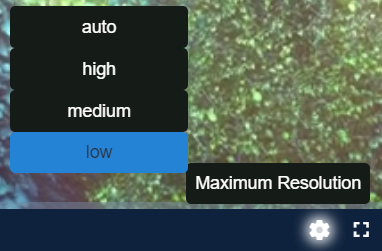
To apply the cap programmatically, simply call the setQualityCap() method passing the quality level to be applied. For example:
playerInstance.otvtoolkit().otvResolutionCapper().setQualityCap("Low");
In this example, "Low" is one of the default labels configured.
Customising
There are options for customisation and overriding the defaults:
-
The quality levels and their labels can be overridden with the following option:
JavaScriptplayerInstance.otvtoolkit().otvResolutionCapper({ qualityLabels: { Unlimited: [NaN, NaN], "1080p": [1920, 1080], "720p": [1280, 720], "480p": [640, 480] } });An option with the value
[NaN, NaN]has the effect of clearing the cap. -
The name of the feature within the control bar menu can be set with the following option:
JavaScriptplayerInstance.otvtoolkit().otvResolutionCapper({ menuTitle: "Limit Resolution" });