
There are common elements within the two platforms' app structures:
-
config and metadata files
-
index.html
-
CSS files
-
files and folders of any required payload
A payloaded App's contents look very similar to an App destined to work with a hosted SDK and player location. In the diagrams below, green highlighted folders and files are what makes the payload difference. The configuration and metadata also differ to indicate whether the Web App is found within the App payload or whether it redirects to a hosted site. Each of the key files' contents are described below.
Tizen
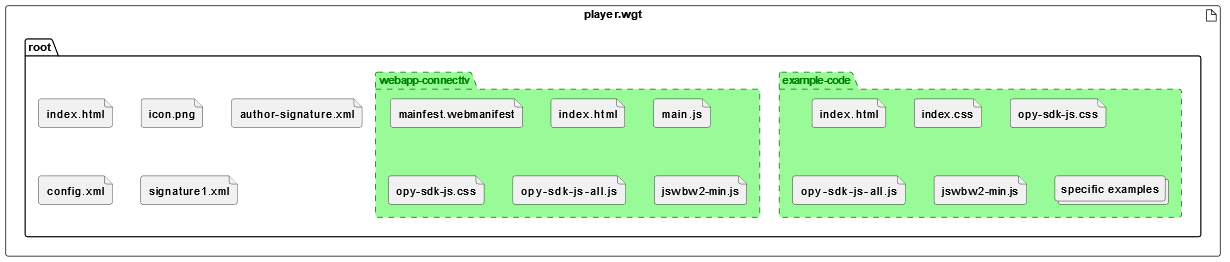
Tizen payload
The config.xml here lists the App requirements and privileges, including the permitted navigation domains. The <content> XML field directs the App to the internal index.html.
tizen payload config.xml
<widget xmlns:tizen="http://tizen.org/ns/widgets"
    xmlns="http://www.w3.org/ns/widgets" id="" version="1.0.0" height="1080" width="1920" viewmodes="maximized">

    <!-- GENERAL -->
    <tizen:application id="qUBvniWGU7.otv" package="qUBvniWGU7" required_version="2.3"/>
    <name>otvPlayer</name>
    <tizen:profile name="tv-samsung"/>
    <content src="index.html"/>
    <icon src="icon.png"/>

    <!-- FEATURES -->
    <feature name="http://tizen.org/feature/screen.size.normal.1080.1920"/>

    <!-- METADATA -->
    <tizen:metadata key="http://samsung.com/tv/metadata/devel.api.version" value="2.3"/>
    <tizen:metadata key="http://samsung.com/tv/metadata/multitasking.support" value="true"/>

    <!-- PRIVILEGES -->
    <tizen:privilege name="http://developer.samsung.com/privilege/network.public"/>
    <tizen:privilege name="http://tizen.org/privilege/tv.audio"/>
    <tizen:privilege name="http://developer.samsung.com/privilege/drmplay"/>
    <tizen:privilege name="http://developer.samsung.com/privilege/productinfo"/>
    <tizen:privilege name="http://tizen.org/privilege/tv.inputdevice"/>
    <tizen:privilege name="http://tizen.org/privilege/application.launch"/>

    <!-- SETTINGS -->
    <tizen:setting screen-orientation="landscape" context-menu="enable" background-support="disable" encryption="disable" install-location="auto" hwkey-event="enable"/>

    <!-- SECURITY -->
    <access origin="*" subdomains="true"></access>
    <tizen:allow-navigation>otvplayer.nagra.com</tizen:allow-navigation>
    <access origin="https://otvplayer.nagra.com" subdomains="true"></access>

</widget>
This is supported by the index.html and any JavaScript and CSS needed to support the presentation of the entry page. Our simple example contains minimal text and icons with hyperlinks to the Web Apps within the payload folders.
tizen payload index.html
<!DOCTYPE html>
<html lang="en-gb" xmlns="http://www.w3.org/1999/xhtml">
	<head>
		<title>Nagra webOS Demo App</title>

		<meta charset="utf-8" />
		<meta name="viewport" content="width=device-width, initial-scale=1" />

		<meta http-equiv="Content-Type" content="text/html; charset=utf-8" />
		<link rel="stylesheet" href="styles/styles.css" />
	</head>

	<body><center>
			<img src="https://docs.nagra.com/sites/default/files/svg_icons/icons_blue/OpenTV_Player.svg">
		<h1>Nagra CONNECT Player Demo App</h1>
		<img width="25%" src="https://download.tizen.org/misc/Tizen-Brand/01-Primary-Assets/Lockup/On-Light/01-RGB/Tizen-Lockup-On-Light-RGB.png">
		<p>
			<a href="webapp-connecttv/index.html"><img src="
				https://docs.nagra.com/sites/default/files/svg_icons/icons_blue/Connected_TV.svg">opy-sdk-js Webapp embedded within payload of App</a>
		</p>

		<p>
			<a href="example-code/index.html">opy-sdk-js Example Code embedded within payload of App<img src="
				https://docs.nagra.com/sites/default/files/svg_icons/icons_blue/Development_Tools.svg"></a>
		</p>

		<p>
			<a href="dasc/sample_application/index.html"><img src="https://docs.nagra.com/sites/default/files/svg_icons/icons_blue/ENABLE.svg">das-web-client Sample Application embedded within payload of App</a>
		</p>

		<p>
			<a
				href="https://otvplayer.nagra.com/demo/html5/latest/connecttv-router/"
				>Browse to Hosted versions<img src="https://docs.nagra.com/sites/default/files/svg_icons/icons_blue/Cloud_TV.svg"></a
			>
		</p></center>
	</body>
</html>
Tizen hosted
The config.xml here again lists the simpler App requirements and privileges. However, the significant difference is the <content> XML field, which directs the App to the hosted URL and renders the index.html effectively redundant.
tizen hosted config.xml
<widget xmlns:tizen="http://tizen.org/ns/widgets" xmlns="http://www.w3.org/ns/widgets" id="" version="1.0.0" viewmodes="maximized">
    <access origin="*" subdomains="true"></access>
    <access origin="https://otvplayer.nagra.com" subdomains="true"></access>
    <tizen:allow-navigation>otvplayer.nagra.com</tizen:allow-navigation>
    <tizen:application id="qUBvniWGU7.otv" package="qUBvniWGU7" required_version="2.3"/>
    <content src="https://otvplayer.nagra.com/demo/html5/latest/connecttv-router/"/>
    <tizen:content-security-policy>default-src *; connect-src *; media-src blob: ; img-src * data: ; style-src 'self' 'unsafe-inline' 'unsafe-eval' https://maxcdn.bootstrapcdn.com https://cdn.jsdelivr.net/; script-src 'self' 'unsafe-inline' 'unsafe-eval' https://cdnjs.cloudflare.com/; child-src blob: ; font-src data: ;</tizen:content-security-policy>
    <feature name="http://tizen.org/feature/screen.size.normal.1080.1920"/>
    <icon src="icon.png"/>
    <name>otvPlayer</name>
    <tizen:privilege name="http://tizen.org/privilege/tv.inputdevice"/>
    <tizen:privilege name="http://tizen.org/privilege/internet"/>
    <tizen:privilege name="http://tizen.org/privilege/application.launch"/>
    <tizen:privilege name="http://tizen.org/privilege/network.connection"/>
    <tizen:profile name="tv-samsung"/>
    <tizen:setting screen-orientation="landscape" context-menu="enable" background-support="disable" encryption="disable" install-location="auto" hwkey-event="disable"/>
</widget>
webOS
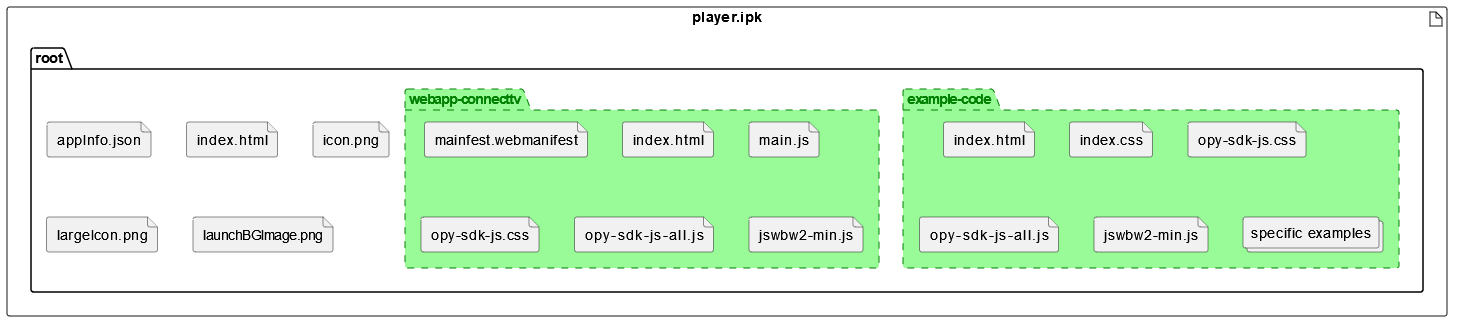
webOS payload
The appInfo.json file determines whether this is a Web or Native App via the type field, and the main field directs the App to the index.html file within the App.
webOS payload appInfo.json
{
    "id": "com.nagra.opydemo",
    "version": "1.0.0",
    "vendor": "Nagra Media UK Ltd",
    "type": "web",
    "main": "index.html",
    "title": "OpenTV Player",
    "icon": "icon.png",
    "iconColor": "#FFFFFF",
    "largeIcon": "largeIcon.png",
    "splashBackground": "launchBGImage.png",
    "bgImage": "launchBGImage.png",
    "uiRevision": 2
}
The index.html then provides the HTML and any JavaScript and CSS needed to support the entry page's presentation. The simple example contains only minimal text and icons with hyperlinks to the Web Apps within the payload folders.
webOS payload index.html
<!DOCTYPE html>
<html lang="en-gb" xmlns="http://www.w3.org/1999/xhtml">
	<head>
		<title>Nagra webOS Demo App</title>

		<meta charset="utf-8" />
		<meta name="viewport" content="width=device-width, initial-scale=1" />

		<meta http-equiv="Content-Type" content="text/html; charset=utf-8" />
		<link rel="stylesheet" href="styles/styles.css" />
	</head>

	<body><center>
			<img src="https://docs.nagra.com/sites/default/files/svg_icons/icons_blue/OpenTV_Player.svg">
		<h1>Nagra CONNECT Player Demo App</h1>
		<img src="https://upload.wikimedia.org/wikipedia/commons/5/59/LG_WebOS_New.svg">
		<p>
			<a href="webapp-connecttv/index.html"><img src="
				https://docs.nagra.com/sites/default/files/svg_icons/icons_blue/Connected_TV.svg">opy-sdk-js Webapp embedded within payload of App</a>
		</p>

		<p>
			<a href="example-code/index.html">opy-sdk-js Example Code embedded within payload of App<img src="
				https://docs.nagra.com/sites/default/files/svg_icons/icons_blue/Development_Tools.svg"></a>
		</p>

		<p>
			<a href="dasc/sample_application/index.html"><img src="https://docs.nagra.com/sites/default/files/svg_icons/icons_blue/ENABLE.svg">das-web-client Sample Application embedded within payload of App</a>
		</p>

		<p>
			<a
				href="https://otvplayer.nagra.com/demo/html5/latest/connecttv-router/"
				>Browse to Hosted versions<img src="https://docs.nagra.com/sites/default/files/svg_icons/icons_blue/Cloud_TV.svg"></a
			>
		</p></center>
	</body>
</html>
webOS hosted
The appInfo.json file will be identical to the payloaded example. The only difference for hosted is that the index.html file directs the App to the hosted URL specified.
webOS hosted index.html
<!DOCTYPE html>
<html lang="en-gb">
	<head>
		<title>Loading...</title>
		<meta
			http-equiv="refresh"
			content="0;url=https://otvplayer.nagra.com/demo/html5/latest/connecttv-router/"
		/>
	</head>

	<body></body>
</html>