
API context
This document describes the API (Publishing Interface) between the NAGRA Content Workflow Manager (CWM) and the third-party implementing this interface. The Asset Publishing interface supports below basic functionalities:
-
LoadAsset
Publishes the asset file from source to a destination CDN based on the URL provided. The asset file may be a single file (eg: *.ts) or a directory. -
PurgeAsset
Purges the asset file (eg: *.ts or directory) from the destination CDN.
Third-parties can implement either of the methods LoadAsset or PurgeAsset of the Publishing Interface or both the methods. If a third-party is implementing only the PurgeAsset method, then the location of the asset that is published on CDN should be synchronized with asset file location that will be used by the purge method.
Use cases
LoadAsset
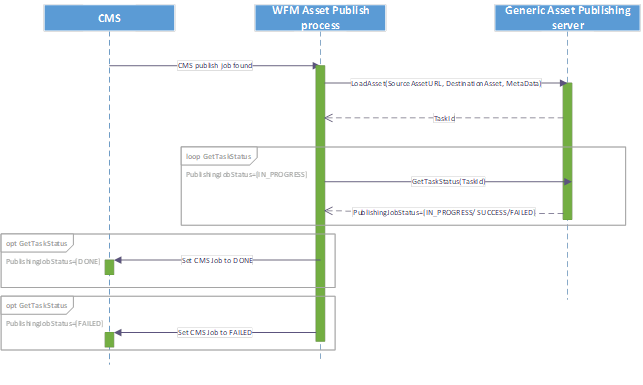
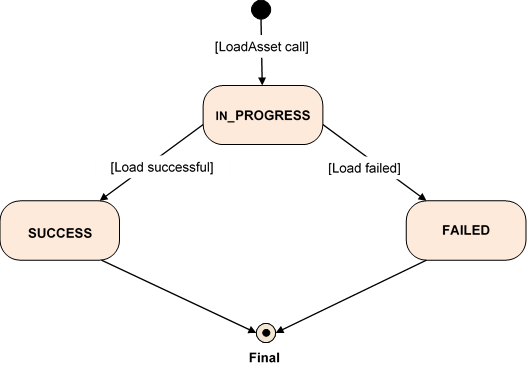
As part of a publish asset workflow, the CWM constructs a request message containing the “SourceAssetURL”, “DestinationAsset” and “MetaData”, and makes a SOAP call to the Generic Asset Publishing server. The publishing server returns a “TaskId” as part of response message. This “TaskId” will be used to retrieve the status of the LoadAsset task. Based on the publishing job status (SUCCESS/FAILED), the WFM updates the CMS publish job status (DONE/FAILED) in the CMS database.
Basic call sequence for LoadAsset
Load asset task state diagram
PurgeAsset
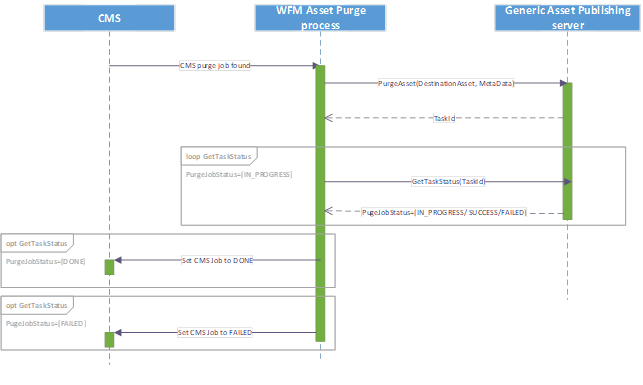
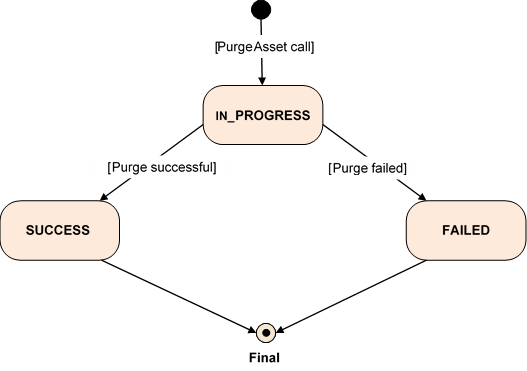
As part of purge asset workflow, the CWM constructs a request message containing “DestinationAsset” and “MetaData”, and makes SOAP call to the Generic Asset Publishing server. The publishing server returns a “TaskId” as part of the response message. This “TaskId” will be used to retrieve the status of the PurgeAsset task. Based on the purge job status (SUCCESS/FAILED) WFM updates the CMS purge job status (DONE/FAILED) in the CMS database.
Basic call sequence for PurgeAsset
Purge asset task state diagram
SOAP mechanism
The WSDL (APUBI.wsdl) is provided with XSD schema to validate (and type) the SOAP message.
For every SOAP method, a request, a response and a fault XSD are provided.
APUBI.wsdl and all XSDs are available in AssetPublishing-Interface-v1.0.0.zip file.
Fault management
The fault schema only allows the detail part of the fault message to be validated. See the <message> element in the following example:
<soap:Envelope xmlns:soap="http://schemas.xmlsoap.org/soap/envelope/">
  <soap:Body>
      <soap:Fault>
         <faultcode>env:Server</faultcode>
         <faultstring>Internal error (Database Error)</faultstring>
         <detail>
                <ExceptionWS xmlns=" wfm:APUBI/v1/schemas">
                       <message>Task Id does not exist</message>
                </ExceptionWS>
         </detail>
     </soap:Fault>
  </soap:Body>
</soap:Envelope>
The Fault sections of this document list error messages that must at least be managed. The third party vendor can specify additional error messages with the only constraint that they must be human-readable.
The NAGRA CMS does not send any SOAP headers or namespaces in the request. Fault messages should be returned with an HTTP error response code, for example, 400, 500, etc.
Interface specification
The interfaces are explained in the following sub-pages: