
Overview
Download2Go lets you enable users to download content for offline viewing.
This feature uses the Content Licensing Management Service (CLM, part of SSP – Security Services Platform) to generate downloadable licences. So the functionality is only available in deployments that include SSP.
Alternatively, you can also enable this functionality if you integrate with a non-NAGRA authorisation provider.
Prerequisites
Before a user can download a content, the content must have the storageAllowed flag set on it.
storageAllowed can be set on:
-
Products
-
Technical contents
-
Editorial channels
-
Technical channels
-
Events
If a channel or event is flagged as downloadable, it means that the the workflows that extract catch-up (typically LTCU) content will flag the resulting catch-up technical contents as downloadable.
For live content, there are two typical supported scenarios:
-
All events on a channel should be downloadable:
-
Enable Download2Go on the editorial channel and any technical channels.
-
In OpCon, select Create Automatically under Download to Go to enable Download2Go for all new events created for the channel.
-
-
Granular control is required over which events should be downloadable:
-
Enable Download2Go on the editorial channel and any technical channels.
-
Ensure the
storageAllowedflag is set correctly for each event when the EPG is ingested.
-
For a content to be downloadable, it must be flagged as such at both the product and the content levels.
This provides the necessary flexibility to allow a content to be downloadable as part of one product, but not as part of a different product.
These can be set in several different ways:
-
In OpCon. See:
-
Channels – enable Download2Go for an editorial and/or technical channel (in Replay TV settings) – see Enabling and disabling Replay TV for channels.
-
Events – enable Download2Go for an event – see Technical details.
-
Technical (VOD) content – enable Download2Go for a technical content – see Technical versions.
-
Products:
-
Enable Download2Go for a live subscription product – see Live subscriptions.
-
Enable Download2Go for a transactional VOD (TVOD) product – see Transactional VOD (TVOD).
-
Enable Download2Go for a subscription VOD (SVOD) product – see Subscription VOD (SVOD).
-
Enable Download2Go for a Pat-Per-View (PPV) product – see Pay-Per-View (PPV).
-
-
-
When ingesting XML. See:
-
editorialChannel (editorial-based) (includes both editorial channel and events)
-
When ingesting using the CPM APIs. See:
Licence validity
A licence for offline viewing has a different validity period from a regular licence. Its behaviour is somewhat different from that of a streaming licence, as shown in the following diagram:
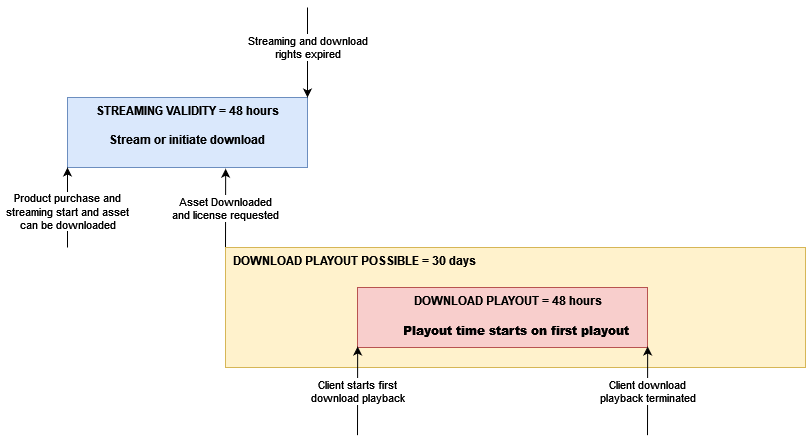
The periods shown in the diagram are examples. The actual values can be configured at the product level. See:
-
The Storage Duration and Storage Start Period fields when creating or editing a product in OpCon:
-
The
storageDurationandstorageStartPeriodfields when creating a product through the CPM APIs in Creating a product
Supported use cases
To enable the user to download content, a client application needs to do the following: