
Overview
Content is generally available in three modes:
-
Live – content is delivered on a channel as part of a schedule of events
-
On-demand – content is available on demand. This may be Video on Demand (transactional or subscription) and short- or long-term catch-up (STCU and LTCU).
-
Deeplink – content is available for playback through third-party applications.
In order to represent a piece of content, information about it, how it subscribed/purchased, how it is discovered in the user interface and how it is played back, several objects maybe necessary at ingest to create all the information necessary for the operator to market the content and for the user application to display to the end user. Below is a description of the entities and their relationships.
Entity model
The following describes the main high-level entities in OpenTV Platform’s data model and their purpose.
Some entities are used and shared across different content consumption types.
-
Editorial channels
An editorial channel provides all the information necessary to present a channel to a user. This would typically include its name, a logo, and where it is presented in a list of channels (channel number).
It may also indicate features that are allowed or available on the channel including STCU, LTCU, sStart-over, and whether NPVR is available (or not). It does not contain any information for the connection and playback to the broadcast/channel. -
Technical channels
A technical channel represents a playable version of the editorial channel; this may be via DVB (Cable, Satellite, Terrestrial), IPTV or OTT. There may be multiple technicals of the same transmission type; i.e., a DASH and HLS version for the OTT channel, or multiple technicals representing the same channel in different transmission media; i.e., one DVB Cable, two OTT, etc… The technical channel contains details of how to connect to the channel; i.e., playback URL, frequency, etc. and details of the security information and usage rules for playback. -
Editorial content
An editorial content provides all the information necessary to present content to a user. This would typically include its name, description, genre, age rating, type etc., including localisations where devices may present information in multiple languages.
It may contain references to other associated content; i.e., series or season references if the content was an episode.
It may contain references to how the content can be viewed (products), and how the content may be presented in user interfaces (part of a content group or node).
The editorial content ID can be used to gather further information on the content; i.e., imagery and cast and crew metadata.
An editorial content would have one, multiples of, or a combination of the following objects associated to it.-
Channel events
A channel event represents when a content is available in a LIVE channel schedule. If start-over and catchup features are enabled, the content may be available for a period of time in the past (typically called reverse EPG in a user interface).
To view an event, the application typically uses the channel information referenced in the event to find technical channel playback details. The main information an event contains differently to editorial content is its scheduled broadcast times. -
Technical contents
Technical content represents how on-demand content can be played back. On-demand content is typically OTT content, although other transport mechanisms (RTP/RTSP) could also be used. There may be several technical contents related to a single editorial content; i.e., separate HLS and DASH OTT versions, or SD / HD / UHD for different devices / marketable choices. -
Deeplink
A deeplink represents content that is played back through third-party applications. An operator may offer third-party D2C content as part of a bundled subscription to its users, and carry its metadata in the platform to offer an enriched user experience. The deeplink contains a URL that typically indicates how to launch the third-party application (directly to playback or into a media card) along with the content identifier for playback.
-
-
Series and seasons
A series is a collection of episodes of a TV program with a single title and characters. A series usually has one or more seasons, where a season is a group of episodes that are broadcast or released consecutively (or sometimes released all at once). -
Products and product links
-
A product is anything that can be marketed and sold. There are multiple types of product:
-
Live subscription product – one or more broadcast TV channels or channel groups (see below)
-
Subscription VOD product – a subscription that is paid for regularly which gives access to a VOD catalogue
-
TVOD product – an individual VOD content that can be purchased either permanently or on a time-limited basis (rental)
-
Pay-per-view (PPV) product – an individual live event that a user can purchase access to (for example, a premium football or boxing match)
-
Capability product – the ability to use certain functionality (for example, the ability to record using NPVR or to use Netflix as a bundled service)
-
-
A product link is how a product is linked to the content that it includes. Each product link references one product and one of the following:
-
Editorial channel
-
Technical channel
-
Event
-
Editorial content
-
Node
-
Content group
-
-
-
Content groups (collections) and content group links
-
A content group is a collection of contents (for example, a season of a particular show). A content group can be either:
-
Static – a simple list of contents
-
Dynamic – based on search criteria
A content group can contain other content groups (for example, a content group for a series that contains the content groups for the individual seasons). A content group can belong to multiple parent content groups (unlike nodes, which can only have one parent).
-
-
A content group link is how a content group is linked to the contents it includes. Each content group link references one entity and associates it with one or more content groups. An entity can be:
-
An editorial channel
-
An editorial content
-
Another content group
-
-
-
Channel groups and channel group links
A channel group is specific kind of content group for grouping broadcast channels. A channel group can be added to:-
A live subscription product – this is easier than adding the channels individually
-
A rail that is displayed in a client application – see Rails and content discovery via Rails
Channel groups can be nested and (unlike nodes) a child group can belong to more than one parent.
To associate channels with a channel group, you must create a content group link (see above). -
-
Nodes and node links
-
A node is a container for VOD and catch-up (STCU and LTCU) content and allows you to group content within a VOD catalogue. For example, you can group content into nodes for different genres, trending, news, and so on.
Nodes can be arranged hierarchically – a node can be a child of another node.
A node with no parent node is known as a root node. There can be multiple root nodes.
Nodes can be used to create a structure within a VOD catalogue that can be used by a client application to allow the user to navigate through the catalogue.
Note that a content item cannot belong to more than one node. -
A node link associates a single content item with one or more nodes.
-
-
Trailers (promotions) and trailer links:
-
A trailer is an editorial content that has a
contentTypeoftrailer. Trailers are ingested in the same way as any other editorial contents (movies, episodes of TV shows, and so on). -
A trailer link associates a “promotable” (usually an editorial content with a
contentTypeofmovie) with a trailer (an editorial content with acontentTypeoftrailer).
-
-
Channel lineups? (Would this really be used beyond CEX )
-
A. N. Other I’ve forgotten
LIVE
<add diagram>
<need something about IDs here too>
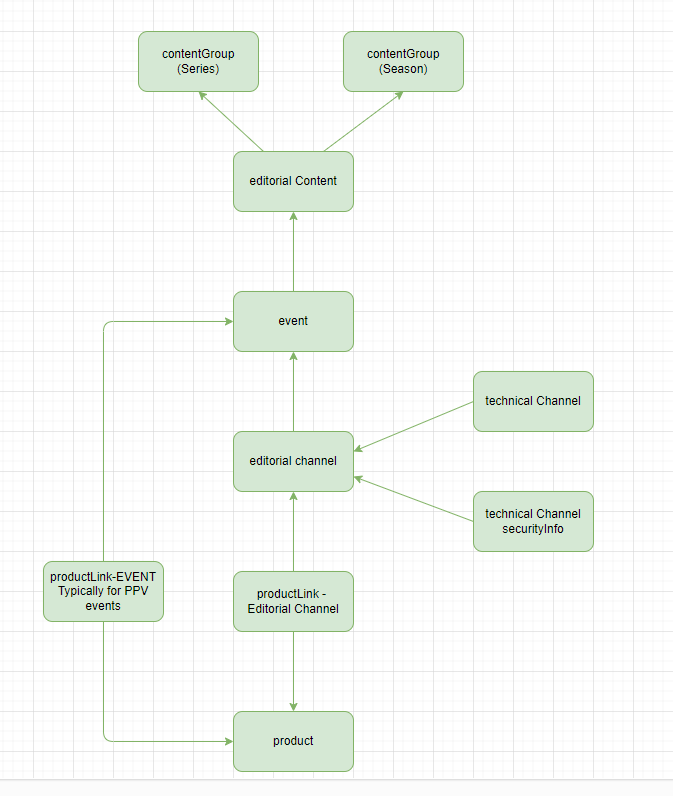
Series Content Groups
<Need something on the uniqueness of the seriesRef across channels for series recording to function>
<Also need to describe how recordings get de-duplicated (i.e. content recording vs event recording from nPVR) so metadata can be mapped accordingly)>
On Demand
<add diagram>
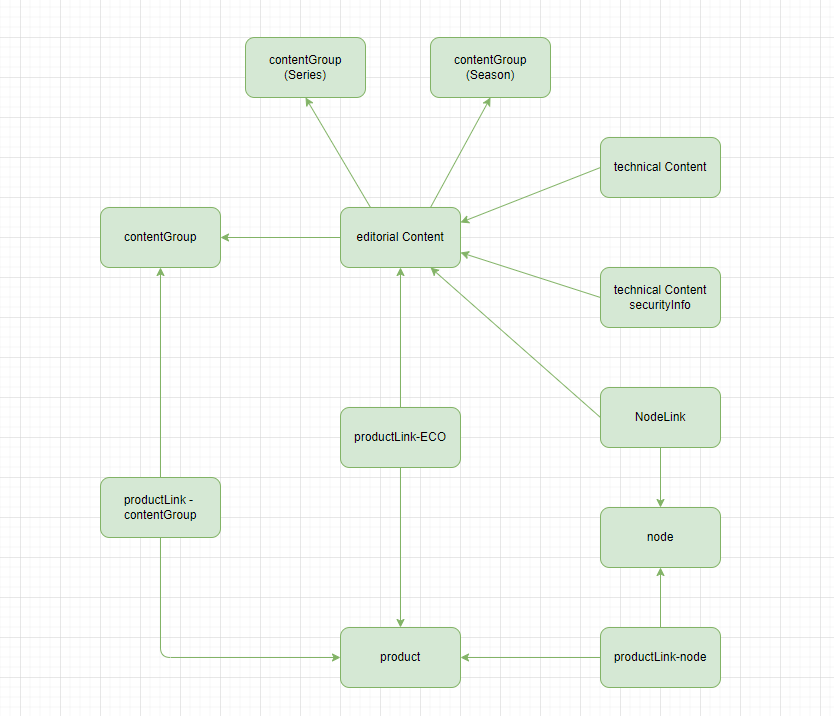
<need something about IDs here too>
Deeplink
<add diagram>
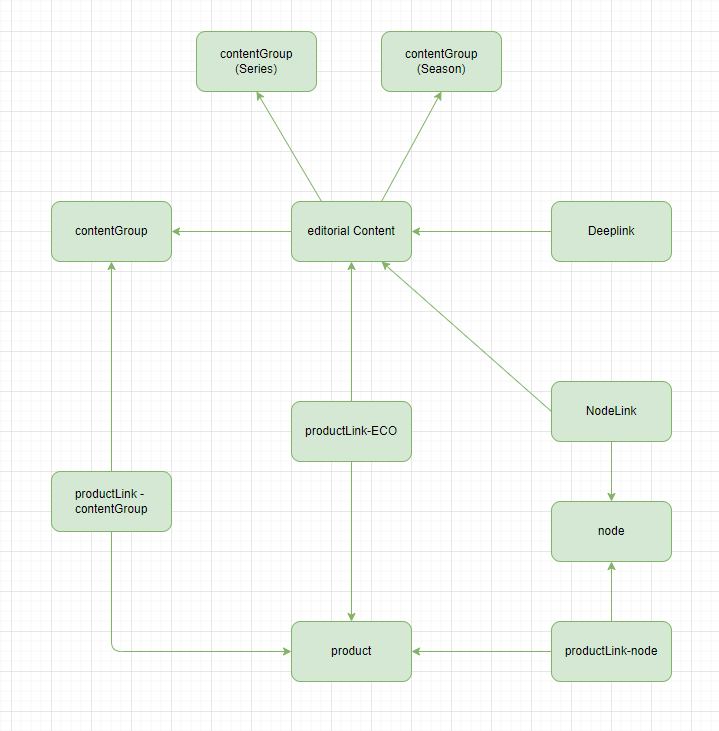
<need something about IDs here too>
Content Presentation and availability (Catalogue & Products)
In order for any channel, on-demand, or deeplink content to be visible to users, there has to be an associated product that indicates how it is available (subscription, PPV, etc…).
A product does not describe the content that it includes. To associate content with a product, a product link must be created. This can link individual contents or groups of contents to a product.
Content can be grouped into:
-
Nodes
-
Content groups (static or dynamic), including ones representing series and seasons
-
Channel groups (a special kind of content group)
Describe how content can be organised and products associated to them.
-
Node
-
Content groups
-
Product Link
-
Event (Typically for PPV)
<add diagram>
<need something about IDs here too>
List of “CORE” and metadataSet properties that impact system behaviour / logic
Detailed explanation of all the fields for all the entities. API vs XML is just the ingest method, the details of property/fields names should relevant to both.
Ideally, this needs automating. Keeping it solely either within the XSD or the API docs is probably not going to be useful, but the property descriptions should be under some source control.
How can the field/property details get exported into something readable here?
Methods of integration
There are two ways to add and update metadata in OpenTV Platform:
-
XML integration – metadata is added/updated by ingesting XML files
-
API integration – metadata is added updated by making API calls
These are explained in detail in the following pages:
Impacts on Metadata Server (MDS) and Content Builder
<how the ingested data looks in MDS and Content Builder – what you get out (“if I put in X I get out Y”)>
<Explain that MDS flattens the objects into a single entity for consumption by clients>
<Explain the precedence of “none” and “locale” metadataSet to end users>
Impacts on User Recordings Behaviour
< Series recording is channel bound >
< How are duplicated content identified (no duplicate recording) >