
Introduction
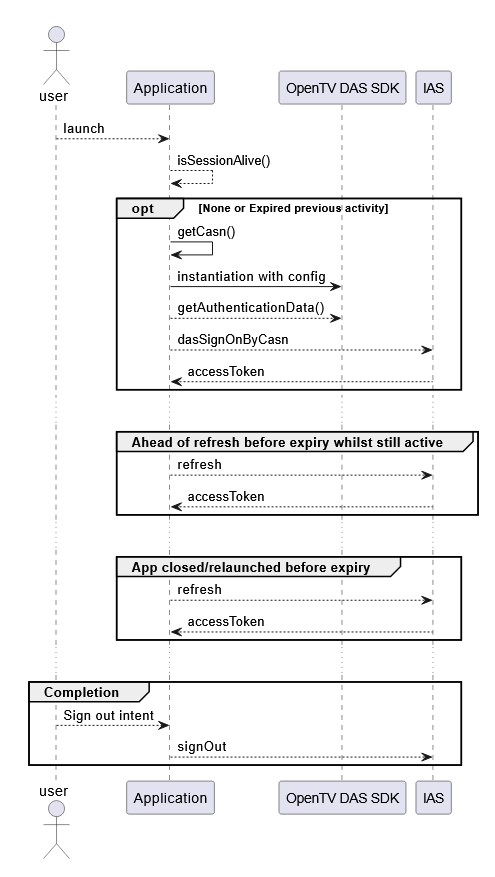
This page describes the sequence of how the client app uses the IAS dasSignOnByCasn API.
OpenTV Platform allows managed devices (such as STBs) to sign in using a device’s conditional access serial number (caSN).
This method uses the Device Authentication Services (DAS) to provide an additional layer of security that prevents unauthorised access using (for example) a shared serial number.
Available functionality
-
The client app can check at start if a session is still active from a previous launch.
-
If not, the app/user needs to sign in.
-
-
Initial sign in to obtain access and refresh tokens from IAS.
-
Persistence of tokens and attributes to permit re-launch recovery.
-
Background timer-based token refresh procedures.
-
Sign out capability.
API outline
Project setup
To use the OpenTV DAS SDK, place the copy of the SDK .aar file in the libs folder.
...
dependencies {
	...
    implementation fileTree(include: ['*.aar'], dir: 'libs')
	...
	// These are transitive dependencies needed by the SDK, but not included in our .AAR
    implementation "androidx.annotation:annotation:1.2.0"
    implementation "androidx.appcompat:appcompat:1.3.1"
	...
}
...
Head-end configuration
The head-end should deploy the configuration for IAS to SSP DAS and provision all the devices. The configuration of the isDASRequired flag should also be set.
Sign in
A client device has first time and n-th time login states in OpenTV Platform. First time and n-th are determined by the presence of the device created linked to the account in OPF.
To sign in with the IAS dasSignOnByCasn API, the app needs to retrieve the caSN from system and the dasChallenge from the DAS SDK.
https://<host>:<port>/ias/v3/token/actions/dasSignOnByCasn
The payload must include:
-
casn– the device caSN -
dasChallenge– the DAS challenge, returned when Calling DAS to get an authentication challenge -
scheme– the DRM scheme used when creating the DAS challenge (eitherCONNECTorWIDEVINE)
Use the Android system API to retrieve the serial number of the device by using Build.getSerial().
Use the DAS SDK getAuthenticationData() to retrieve the dasChallenge.
The scheme depends on the DAS SDK initialisation parameter. By default it is Widevine, but the app can use Connect by calling DasApi.instance(Das.CONNECT_UUID).
After a successful sign in, OPF will return the access token and refresh token for further usage.
{
   "refresh_token":"eyJraWQiO...",
   "access_token":"eyJraWQiOiIyO...",
   "client_id":"5cd3...962f",
   "fixed_refresh_expires_in":2592000,
   "accountId":"5cd3...962d",
   "refresh_expires_in":172800,
   "expires_in":3600,
   "token_type":"bearer"
}
Refresh token
When a client application connects to OpenTV Platform to gain service, access is gated via an initial authentication of identity which yields an identity access token and a refresh token.
-
The access token is limited to a short duration, typically one hour.
-
The refresh token has a longer duration, for example, up to 48 hours.
When a client discovers that its access token has expired, it submits the refresh token. The account and device status are verified as still valid, and if so, both the access token and the refresh token are re-issued and sent in response to the client. The client then updates its token store and uses the access token as usual. When the new access token expires, the cycle is repeated. If the refresh token is found to have expired, the client will be directed back to credentials sign-on as all information is too old to trust.
Sign out
Intent of user to sign out.