
The Player SDK is built with simulator support to enable you to build and test against an Xcode simulator. When doing so, create a FAT framework (iOS and simulator in one library). This sometimes means when building, you may need to remove arm64 support when building for a simulator.
Excluding simulator support
To exclude the arm64 libraries when building for a simulator:
-
Go to Build Settings and locate Excluded Architectures.
-
Select Any iOS Simulator SDK for both Debug and Release and set them to exclude arm64.
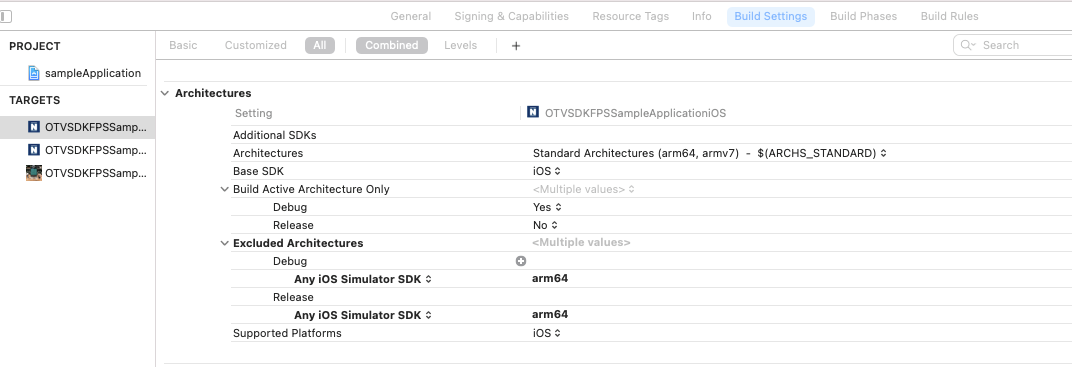
-
You should also set the build flag Validate workspace to Yes as shown below.
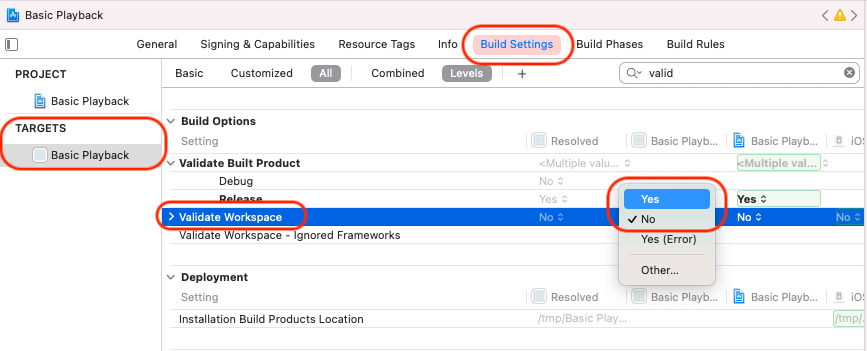
-
Repeat the process for tvOS but select Any tvOS Simulator SDK’ for both Debug and Release.