
Overview
The purpose of this documentation is to guide architects, software experts and developers on the ideal and correct use of version 3 of the OpenTV Platform.
The OpenTV Platform provides access to services required to enable all of the expected use cases performed in a set top box, companion device or OTT playback applications, such as:
-
Authentication and authorisationA user must first be authenticated by the platform before they can use any other service.A user may or may not be authorised to use a service depending on the type of account they have and what services the operator has enabled.
-
Account, user and device informationThe application may need to get account information to display to the user.The application may need to use account or device information to call other services.
-
Browsing past, current and future broadcast events on multiple channels
-
Browsing VOD catalogues
-
Searching for content
-
Content discovery
-
Recommendations
-
Rating content
-
Bookmarking content
-
Marking content as a favorite
-
Watched content / History
-
Purchasing content
-
Account and user subscription information
-
Content license retrieval and playback
-
In-home content playback authorisation
-
Messaging and notifications
-
Reporting on usage
The OPF 3.x architecture is shown below.
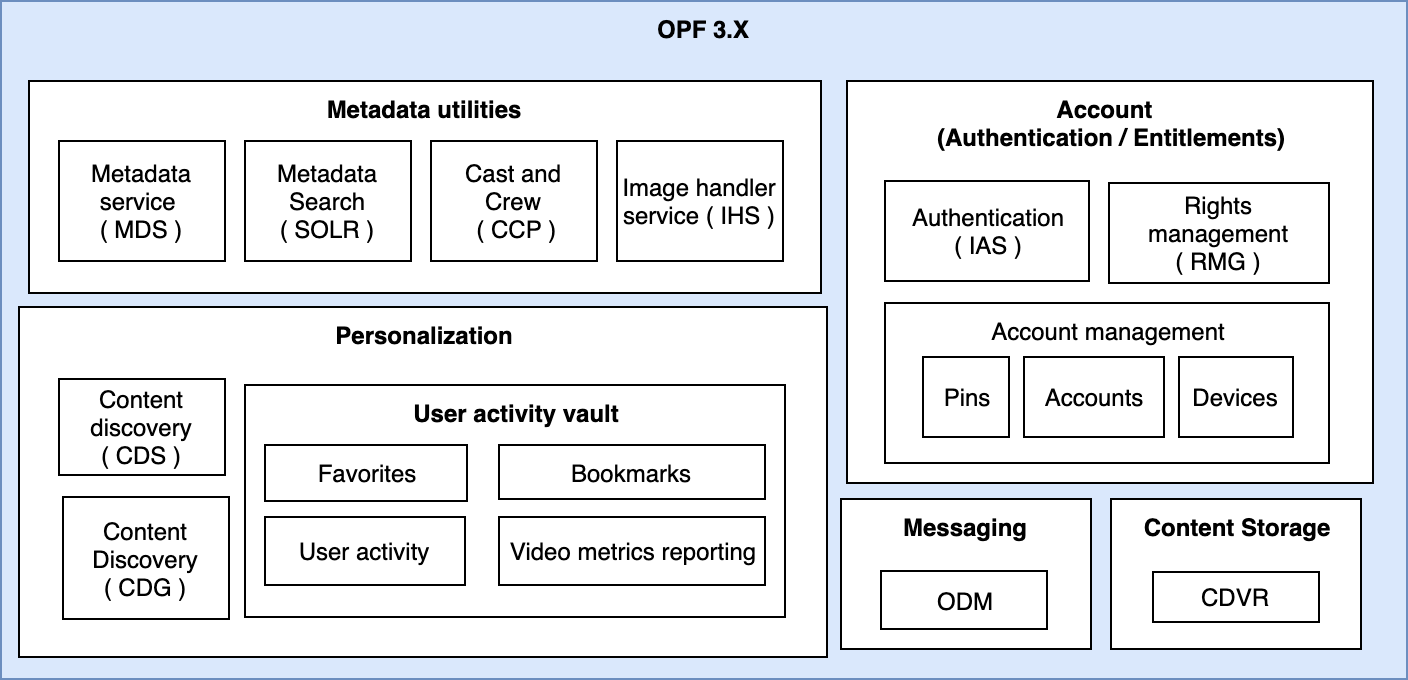
For abbreviation definitions, see Acronyms and terms.
Client types
Devices can be classed as either Set Top Boxes (STB) or open devices. Within these two categories, sub-categories of device types are available with different hardware and different expected use cases, resulting in differing UI functionality and requirements on the Media Live Service Platform. These are not strict categories however, as any device could have any type of hardware.
Set Top Boxes
An STB typically contains some form of TV tuner and connects to a television. For Media Live Service Platform integration purposes, the STB also contains hardware security to protect the keys used to decrypt encrypted content delivered to the box. STBs without hardware security are considered to be open devices as they can only use software security. An STB is identified by one or many of its hardware credentials, for example smartcard id, CASN, NUID or MAC address. The smartcard id will change if the smartcard associated with the box is changed. STBs with hardware security are typically provided to the end customers by the service provider.
A home gateway is a type of STB with additional hardware and features such as multiple tuners, larger storage capacity, and built-in routing capabilities. It also typically includes transcoding and DLNA services that allow the gateway to stream content from its own sources (tuner, PVR, user media on flash storage) to other devices, and to provide information about the content for browsing. A gateway is also able to apply its own encryption to the content key, thereby securing the delivery of content around the home.
Open devices
An open device is any device not controlled by an operator. The hardware is customer-owned, and access to the service is typically provided by an application that sits alongside other apps. Although software security is easier to crack than hardware security, and most of an open device software stack is not controlled by a service operator, platform DRM now provides some level of hardware security to allow higher-quality content on some open devices.
Mobile devices
Tablets and mobiles can run service provider applications that either allow access to content over the internet (OTT) or act as companion devices to browse and control and consume content from a home gateway. Gaming consoles also provide video consumption apps and are treated like mobile devices in almost all cases.
Open STBs
An open STB is an STB without hardware security. It can have the same features as mobile devices but outputs to a TV instead of its own screen. Because of the user experience presented, they are typically used as OTT content gateways rather than companion devices. Examples of open STBs are:
-
Apple TV
-
Amazon Fire TV
-
Android TV
Smart TVs
Smart TVs have hardware powerful enough to run advanced applications similar to those provided on mobile devices and open STBs. Although some may have service provider applications, functionality is usually the same as that of an open STB.
Acronyms and terms
The following terms and acronyms are used throughout this guide.
|
Term/Acronym |
Stands for |
|---|---|
|
ADM |
Account and Device Manager |
|
CASN |
Conditional Access Serial Number |
|
CDG |
Content Discovery Gateway |
|
CDS |
Content Discovery Service |
|
CDVR |
Cloud DVR / Network PVR |
|
DMM |
Device Messaging Manager |
|
DRM |
Digital Rights Manager |
|
DUT |
Device under test |
|
IAS |
Identity Authentication Service |
|
IHS |
Image Handler Service |
|
MDS |
Metadata Server |
|
NUID |
Nagra Unique Id |
|
OTT |
Over the top |
|
RMG |
Rights Manager |
|
SOLR |
Apache SOLR |
|
SRM |
Session Resource Manager |
|
SSP |
Secure Services Platform |
|
STB |
Set top box |
|
UAV |
User Activity Vault |