
OpenTV ENTera & OpenTV Platform Documentation

Get account data

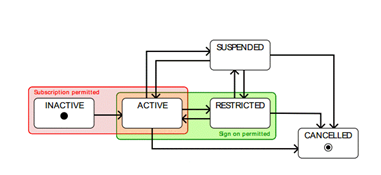
Account states

  • An account comprises devices and profiles (future) relevant to clients.

  • Logging into an account in SUSPENDED or CANCELLED states will result in errors.

  • Account status changes are reflected in a re-fetch of access token (maximum lag of one hour)

  • Device and stream limits are applied as per the profiles linked to account. 
account_1.png

Request

To get the data for an account, send a GET request to:

XML
https://<server>:<port>/adm/v1/user/accounts

This does not take any parameters and does not have a payload. The header must contain a token to identify the account; for details of the header fields see Account and Device Manager (ADM) API documentation.

Headers

  • x-correlation-id – identifier for logging, to correlate messages across a call flow.

  • nv-tenant-id – the tenant ID.

  • token – request authentication token.

Response

The status reflected in the response should be considered for any corner cases in case of suspension, restricted and cancelled. For example:

A successful request returns an HTTP 200 status.

Click here for an example of a successful response.
{
   "status":"ACTIVE",
   "accountProfileId":"DEFAULT",
   "providerId":"SOLUTION_PROVIDER_ID_001",
   "billingAddress":[
      {
         "key":"firstName",
         "value":"tomesgreg"
      },
      {
         "key":"country",
         "value":"UK"
      },
      {
         "key":"city",
         "value":"Cwmbran"
      }
   ],
   "creditSpent":0.0,
   "created":"2018-07-16T05:12:23.052Z",
   "modified":"2018-12-05T07:30:55.798Z",
   "accountProfile":{
      "status":"ENABLED",
      "enableDeviceLimit":false,
      "enableActiveDeviceLimit":false,
      "enableUserLimit":false,
      "enableSessionLimit":false,
      "maxSessionsAllowed":3,
      "created":"2018-07-16T00:52:18.413Z",
      "modified":"2018-07-16T00:52:18.413Z",
      "id":"DEFAULT"
   },
   "pvrStatus":"ENABLED",
   "accountNumber":"nmp.00001",
   "validityPeriodStartDate":"2018-07-31T18:30:00.000Z",
   "validityPeriodEndDate":"2022-01-05T18:30:00.000Z",
   "pins":[
      {
         "accountId":"SOLUTION_ACCOUNT_ID_001",
         "type":"ParentalPin",
         "value":"b9580c8b65222fe2c9422325f06ae2e1",
         "salt":"18a355029d3dce9470b3975545756414642197a7811471795a51caa09951f263",
         "lastChangeDateTime":"2018-11-20T12:12:13.933Z"
      }
   ],
   "signonId":"**********",
    "id":"SOLUTION_ACCOUNT_ID_001"
}

A bad request returns an HTTP 400 status.

If the supplied credentials (token) are not valid, the request returns an HTTP 401 status.

A forbidden request returns an HTTP 403 status.

If the resource does not exist, the request returns an HTTP 404 status.

An internal server error returns an HTTP 500 status.

Click here for an example of an error case.
JavaScript
{
  "message": "string",
  "code": 0,
  "errorCode": 0
}

See also

For full details of this API, see Account and Device Manager (ADM) API documentation.