Skip table of contents

Magazine strips

Overview

A magazine strip defines a rail that is double-height, multi-tile, and can optionally contain hero tiles that span multiple rows. This type is often used for layouts where the content is presented in a magazine-style format, with visually impactful tiles (e.g., hero tiles) that stand out and occupy more space compared to the other smaller tiles.

Example configurationProperties response

For a rail that uses a magazine strip blueprint (in this case, the Hero Magazine 1 instance), the rail’s configurationProperties block looks like this.

JSON
...
"configurationProperties": {
  "client_context": [
    "double height",
    "uniform",
    "2x3 hero"
  ],
  "hero_tile_repeat": true,
  "edge_peek": true,
  "instance": "Hero Magazine 1",
  "layout_style": "dual_row_hero_grid",
  "visible": true,
  "grid_tile_pattern": [
    "4x3"
  ],
  "type": "magazine_strip",
  "scroll_type": "infinite_scroll",
  "grid_tile_pattern_invert": false,
  "hero_tile_aspect_ratio": "2x3",
  "tile_style": "default",
  "spanned_row_navigation": "directional",
  "max_pages": 0,
  "show_more": false
},
 ...

Fields

The following table lists the fields that are specific to magazine strip blueprints. (SeeRail reponses for a full list of rail fields.)

A custom instance of the magazine strip might use any of the available values in the table.

A built-in instance will use specific values as listed in Magazine strip instances, below.

Keys

Type

Values

Description

type

static

magazine_strip

The type field defines the type of rail this blueprint describes.

  • magazine_strip:
    A magazine_strip type defines a rail that is double-height, multi-tile, and can optionally contain hero tiles that span multiple rows. This type is often used for layouts where the content is presented in a magazine-style format, with visually impactful tiles (e.g., hero tiles) that stand out and occupy more space compared to the other smaller tiles.

layout_style

enum

dual_row_hero_grid,

dual_row_grid_hero,

single_row_grid

The layout_style field specifies how the tiles should be arranged within the rail. These options allow for flexibility in how larger tiles (such as hero tiles) are placed alongside smaller content tiles. Hero tiles are optional, but when included, they may repeat at different points within the layout.

  • dual_row_hero_grid:
    This layout style places a large hero tile that spans both rows at the beginning of the rail, followed by smaller grid-style tiles. Hero tiles can repeat throughout the layout, acting as focal points, while the grid tiles present additional content in a more compact, uniform format.

  • dual_row_grid_hero:
    In this style, the grid layout is displayed first, with two rows of smaller tiles, followed by a large hero tile that spans both rows. Hero tiles can repeat throughout the layout, acting as focal points, while the grid tiles present additional content in a more compact, uniform format

  • single_row_grid:
    A simple single row grid layout with no hero tiles. Tiles will be double height.

grid_tile_pattern

enum selector

(duplicates on, re-ordering on)

default,

16x9,

4x3,

3x2,

2x3,

4x5,

1x1

The grid_tile_pattern field defines the layout and aspect ratio of tiles within the rail. This pattern, which may consist of a combination of aspect ratios, is repeated across the rail, and can accommodate duplicate tiles. When combined with hero tiles, the pattern is repeated as part of the overall layout, ensuring consistency in how tiles appear throughout the rail.

  • default:
    The tile pattern is dynamically determined by the client, meaning the client has full control over how the tiles are arranged.

  • 16x9, 4x3, 3x2, 2x3, 4x5, 1x1:
    These are fixed aspect ratios for tiles. You can specify multiple ratios, and they will be repeated across the rail in the order selected. When hero tiles are used, they will be incorporated into the repeating pattern either at the start, or at the end

Examples:

  • Single aspect ratio:
    4x3
    Result: [4x3] [4x3] [4x3] ...

  • Multiple aspect ratios:
    4x3, 16x9
    Result: [4x3] [16x9] [4x3] [16x9] ...

  • Multiple aspect ratios with duplicates:
    4x3, 4x3, 16x9, 16x9
    Result: [4x3] [4x3] [16x9] [16x9] ...

  • Combination with repeating hero tiles:
    4x3, 16x9, (hero tiles)
    Result: [4x3] [16x9] [Hero] [4x3] [16x9] [Hero] ..

  • Combination with non-repeating hero tiles:
    4x3, 16x9, (hero tiles)
    Result: [4x3] [16x9] [Hero] [4x3] [16x9] [4x3] [16x9] ....

grid_tile_pattern_invert

boolean

The grid_tile_pattern_invert field allows for the inversion of the aspect ratio pattern across rows within a 2-row grid. When set to true, the aspect ratios specified for each row in the grid_tile_pattern are inverted between the rows. This feature simplifies the configuration for alternating aspect ratios between two rows, where the pattern in row 1 is swapped for row 2, creating a visually dynamic effect.

  • When set to true: The pattern specified for row 1 is inverted in row 2.
    For example, if row 1 is configured as 4x3, 16x9, the result for row 2 would be 16x9, 4x3.

  • When set to false (the default): The pattern defined in grid_tile_pattern will be applied consistently across both rows, without inversion.

hero_tile_aspect_ratio

enum

default,

16x9,

4x3,

3x2,

2x3,

4x5,

1x1

The hero_tile_aspect_ratio field specifies the aspect ratio for the "hero" tile within a rail layout. The hero tile is typically a larger, more prominent tile designed to draw attention, often placed at the top or highlighted within a section. In a configuration where there are two rows, the hero tile is always intended to span both rows, providing a larger visual impact.

  • default: The aspect ratio of the hero tile is dynamically determined by the client, giving full control over how the hero tile is rendered.

  • 16x9, 4x3, 3x2, 2x3, 4x5, 1x1, 3x1, 4x1:
    These are fixed aspect ratios for tiles.

hero_tile_repeat

boolean

The hero_tile_repeat field controls whether the hero tile appears multiple times within the grid layout, or just once, providing flexibility for layouts with either a single or multiple hero tiles.

  • true: The hero tile will be inserted repeatedly in the grid layout, appearing at multiple positions according to the selected tile pattern. This is useful when multiple hero tiles are needed across the rail for visual consistency or emphasis.

  • false: The hero tile appears only once, typically spanning multiple rows at the top of the rail, providing a singular, prominent visual.

show_more

boolean

The show_more setting instructs the client whether to display a “Show More” link or button within the rail. This link allows users to navigate to a separate screen or view that is specific to the rail content, offering more detailed or expanded options. This is typically used when the content in the rail exceeds the initial set of items shown, and the user can view more items in a dedicated section.

  • true: Displays the “Show More” link or button, allowing the user to load additional content or navigate to a more detailed view.

  • false (default): Hides the “Show More” link, limiting the user to the initially displayed content without offering the ability to view more.

Notes:

  • The actual placement, behaviour and flow of the “Show More” functionality (e.g., the navigation to the next screen or the content load mechanism) is not defined within this blueprint and must be implemented by the client as needed.

  • The client should ensure that the “Show More” experience is intuitive and aligns with the content layout and user interface

max_pages

numeric

(0 to 1000)

The max_pages setting defines the maximum number of pages that can be retrieved for the rail. This value allows clients to control the number of results displayed within the rail, offering more control over how much content is shown at once.

  • 0: No restriction on the number of pages. The client can continue retrieving pages until no more are available, allowing for an infinite or uninterrupted content stream.

  • > 0: The client is restricted to retrieving no more than the specified number of pages. If the rail can display more content, the client must stop retrieving additional pages once the limit is reached.

The max_pages value is an absolute maximum. However, there may not be enough content available to reach the full amount defined. In other words, if the total number of items is less than the maximum, the client will only retrieve what is available.

If max_pages is set to a specific limit and more content exists, the show_morefield can be used to allow the user to "break out" from the rail into a separate page where the max_pages limit is no longer applied. This would allow access to more content beyond the specified max_pages restriction.

Example Usage:

  • Unlimited pages:

    • max_pages: 0

      • This would allow the client to continue fetching additional pages as long as more content is available, without any artificial limitations.

  • Limited pages:

    • max_pages: 5

      • This would indicate the client should be restricted to only retrieving up to five pages, even if more pages are available in the rail's content source. If fewer than five pages are available, the client will retrieve what is available.

visible

boolean

The visible setting acts as a simple flag that allows the client to show or hide a rail without removing it from the template or layout.

  • true (default): The rail will be displayed to the user within the layout.

  • false: The rail will be hidden from view but still remains part of the template. It can be toggled back to true later without needing to modify the layout or template structure.

Magazine strip instances

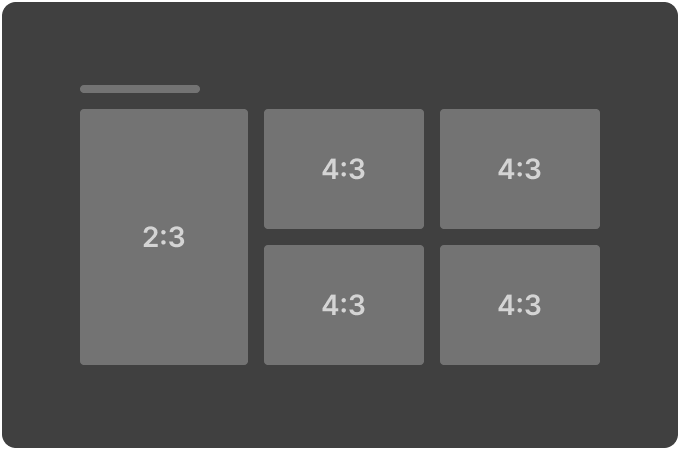
Hero Magazine 1 (2:3 Hero / 4:3 Dual Row)

Appearance

Key

Values

Untitled-20251017-161537.png

type

magazine_strip

layout_style

dual_row_hero_grid

grid_tile_pattern

["4x3"]

grid_tile_pattern_invert

false

hero_tile_aspect_ratio

"2x3"

hero_tile_repeat

true

show_more

false

max_pages

0

visible

true

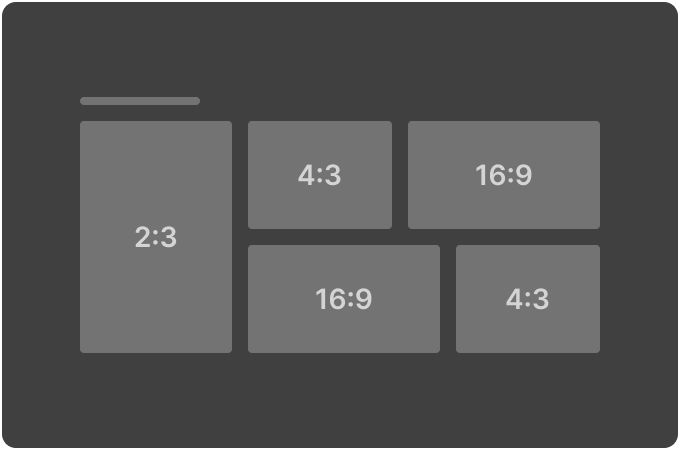
Hero Magazine 2 (2:3 Hero / Alternating 4:3 & 16:9 Dual Row)

Appearance

Key

Values

Untitled-20251017-161555.png

type

magazine_strip

layout_style

dual_row_hero_grid

grid_tile_pattern

["4x3","16x9"]

grid_tile_pattern_invert

true

hero_tile_aspect_ratio

"2x3"

hero_tile_repeat

true

show_more

false

max_pages

0

visible

true

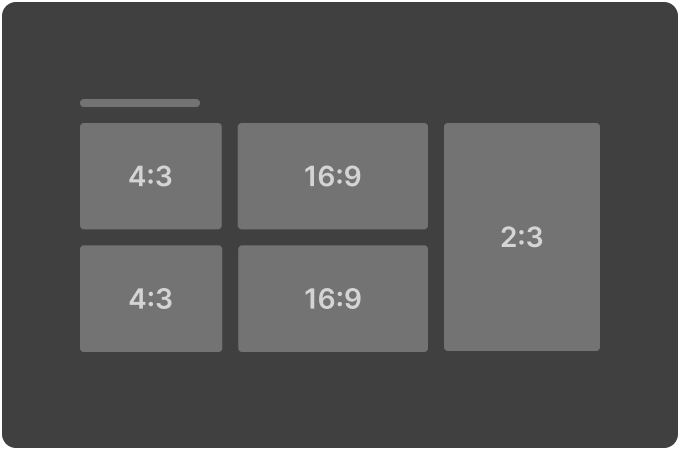
Hero Magazine 3 (4:3 & 16:9 Dual Row / 2:3 Hero)

Appearance

Key

Values

Untitled-20251017-161611.png

type

magazine_strip

layout_style

dual_row_grid_hero

grid_tile_pattern

["4x3","16x9"]

grid_tile_pattern_invert

false

hero_tile_aspect_ratio

"2x3"

hero_tile_repeat

true

show_more

false

max_pages

0

visible

true

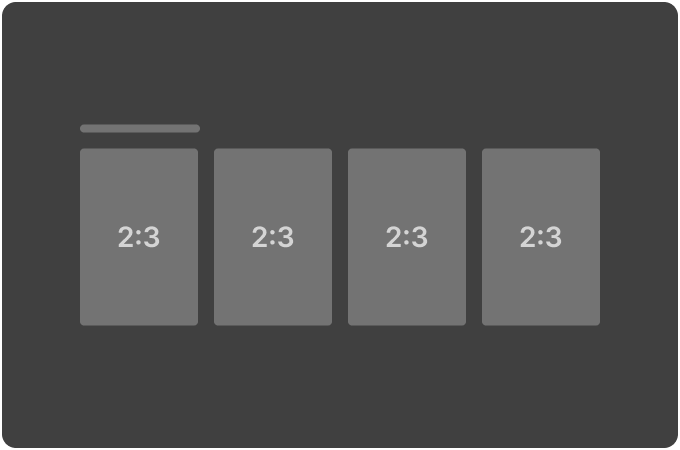
Large Poster Magazine (2:3 single row)

Appearance

Key

Values

Untitled-20251017-161627.png

type

magazine_strip

layout_style

single_row_grid

grid_tile_pattern

["2x3"]

grid_tile_pattern_invert

false

hero_tile_aspect_ratio

"default"

hero_tile_repeat

false

show_more

false

max_pages

0

visible

true

JavaScript errors detected

Please note, these errors can depend on your browser setup.

If this problem persists, please contact our support.