
Getting templates and rails
Typically, a client application will need to make several calls to get all the information it needs to render the different pages that make up its interface and the rails within each page, as shown in the following diagram:
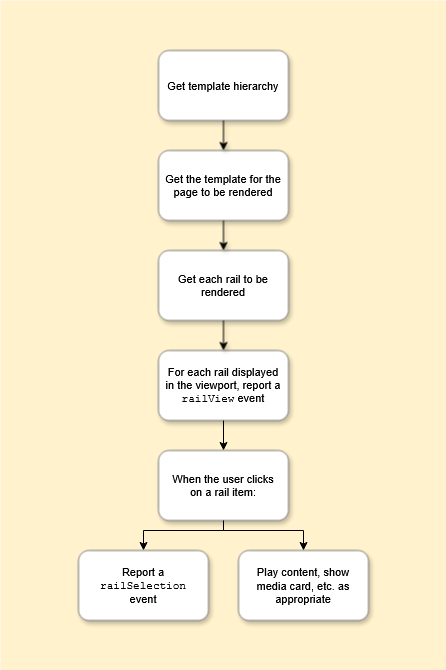
The calls that the client makes are as follows:
-
Retrieve the template hierarchy – call
GET https://<host>:<port>/contentdelivery/v1/templateviews/hierarchyto get the hierarchy of templates that represent the various screens.-
See Template hierarchy responses for details about the response.
-
Note:
-
A client application does not have to use the template hierarchy – it can use a specific set of templates that it retrieves by their IDs.
-
There are some templates that should not form part of the client application’s page hierarchy. For example:
-
Templates used only as the destination for a feature banner
-
-
-
Retrieve the rail structure for a template – for each page/template, call
GET https://<host>:<port>/contentdelivery/v1/templatesummary/{templateId}to get the rails that make up the page (without their contents). The response includes the ID of each rail, which is required for the next step.-
See Template responses for information about how to handle the response.
-
-
Retrieve a specific rail and its contents – for each rail on the page, call
GET https://<host>:<port>/contentdelivery/v2/templateviews/{templateId}/rails/{railId}?limit=10to get the rail contents and metadata.-
See Rail responses for details of how to read and render a rail.Make sure you follow Rails best practices:
-
Load only enough rails to populate the visible part of the screen, plus enough additional rails so that the user does not have to wait for rails to load when they scroll vertically. Load any additional rails only as needed when the user scrolls.
-
Within each rail, load only enough rail items to fill the visible part of the rail and the first part that the user will see if they scroll horizontally, and only load more if they do scroll. (Use the
limit,page, andoffsetparameters to do this.)
-
-
-
When the client displays a rail on the screen, it must report a
railViewevent. As the user scrolls vertically and the client displays more rails, it must reportrailViewfor each new rail that it displays. -
When the user clicks on an item in a rail, the client needs to:
-
Report a
railSelectionevent. See Rails-specific metrics. -
Perform the appropriate action. This depends on the type of item the user clicks on.
-
See Section types in Interpreting template hierarchy, template, and rails responses.
-
-
Every request to Content Delivery must include:
-
The destination (e.g.,
tvormobile) in theNagra-Targetheader. Content Delivery returns the appropriate content for that destination. -
The device type (e.g.,
AndroidoriOS) in theNagra-Device-Typeheader. This ensures that the rails that Content Delivery returns reference the correct technical contents (e.g., an HLS technical for iOS or a DASH technical for Android).
Search
A client application can also use rails for searching. If a search template has been set up in OpCon (see Set up a search template), the client can send a request to Content Delivery that includes search criteria.
The response will consist of a template with a rail that contains the search results, which the client can display in exactly the same way as any other rail.