
To integrate with the Insight platform, the application notifies the Agent of what is happening with the video player. For this purpose, the Agent provides a simple interface that the application can call when the events occur. Examples of these events are:
-
play - the user requests to play an item
-
playing - the video displays the first frame or has finished rebuffing
-
buffering, framesDropped, etc.
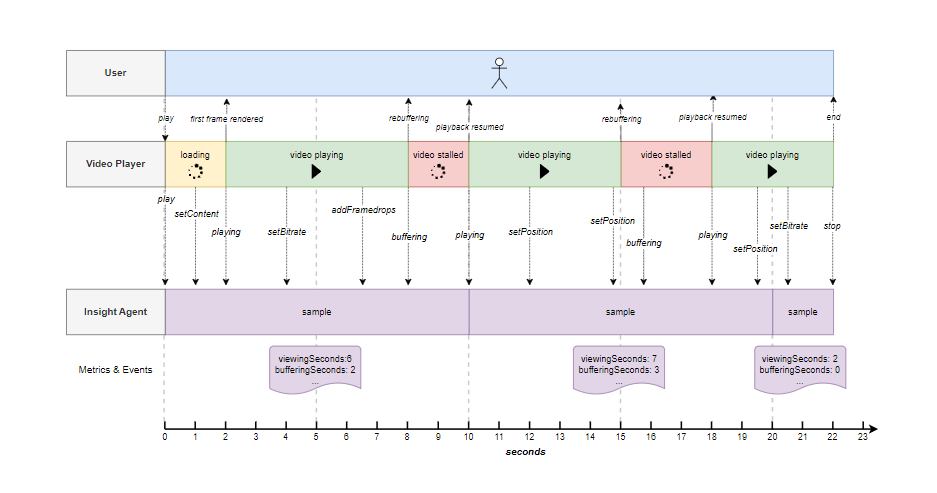
The application needs to call the Agent as things occur with the video player to notify the Agent of the relevant events. The diagram below illustrates a playback sequence.
-
Second 0: The user triggers the video player application to play content
-
Second 2: The content starts playing ( first frame rendered )
-
Second 4: The video player changes the bitrate
-
Second 7: The video player detects dropped frames
-
Second 8: The video stops playing because of a rebuffering event
-
Second 10: The video resumes playing
-
Second 15:The video stops playing because of a rebuffering event
-
Second 18: The video resumes playing
-
Second 2: The video stops
How the Agent reports to the Insight platform
The information reported to the Agent by the application is collected into samples. A sample contains information about what happened during that time for a particular session metrics and events that occurred in a given time.
The Agent takes a sample every number of seconds. The time between samples is defined using the samplingInterval value of the Agent’s configuration. The metrics and events are captured in each sample, as shown in the selection below. The example shows the samples generated for a configuration of samplingInterval of ten seconds.
|
|
Metrics |
Events |
|---|---|---|
|
Sample 1
|
|
|
|
Sample 2
|
|
|
|
Sample 3
|
|
|
Samples are collected on the end-user device until they are reported,
A sample contains information about what occurred during (what). The example above interval is configured at ten seconds.