
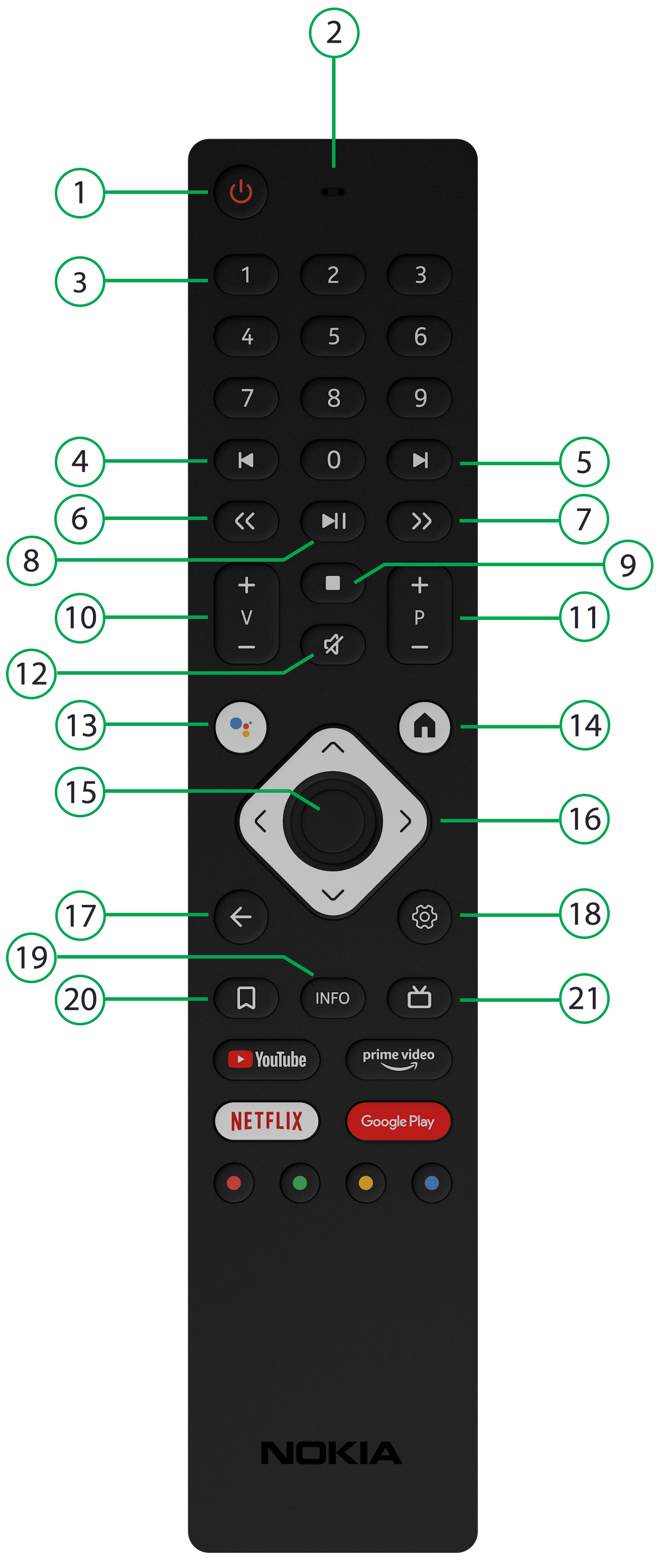
| 1 | Power (remote must be paired with TV) |
| 2, 3 | Microphone, Number keypad |
| 4, 5 | Previous chapter, Next chapter (future use) |
| 6 | Rewind – short press to skip back. Long press to rewind, then short press to increase rewind speed. |
| 7 |
Fast Forward – short press to skip forward. Long press to fast forward, then short press to increase fast forward speed. |
| 8 | Play/Pause |
| 9 | Stop (future use) |
| 10 | Volume Up/Down |
| 11 | Channel Up/Down |
| 12 | Mute |
| 13 | Google Assistant – press and hold to use voice search. |
| 14 |
Google Home and Program Guide – select the “E+ Broadband TV” app from the app list. Once logged in, from live TV press the (17) “Back” button to see the full screen Guide. |
| 15 | Select – press to select an item or to show available options while content is playing (for example Start Over, Record, Favorite, Closed Captions). |
| 16 | Navigation – press left arrow for recently viewed channels. Press up or down arrow for the quick guide. |
| 17 | Back – press to show the previous menu screen. |
| 18 | Android Settings |
| 19 | Android More Info |
| 20 | Android Bookmarks |
| 21 | Google Live TV – to link this button directly to our TV app, go to Settings > Device Preferences > Favorite App, then select the app. |