
OpenTV ION building blocks
Here is is a detailed view of the OpenTV ION building blocks.
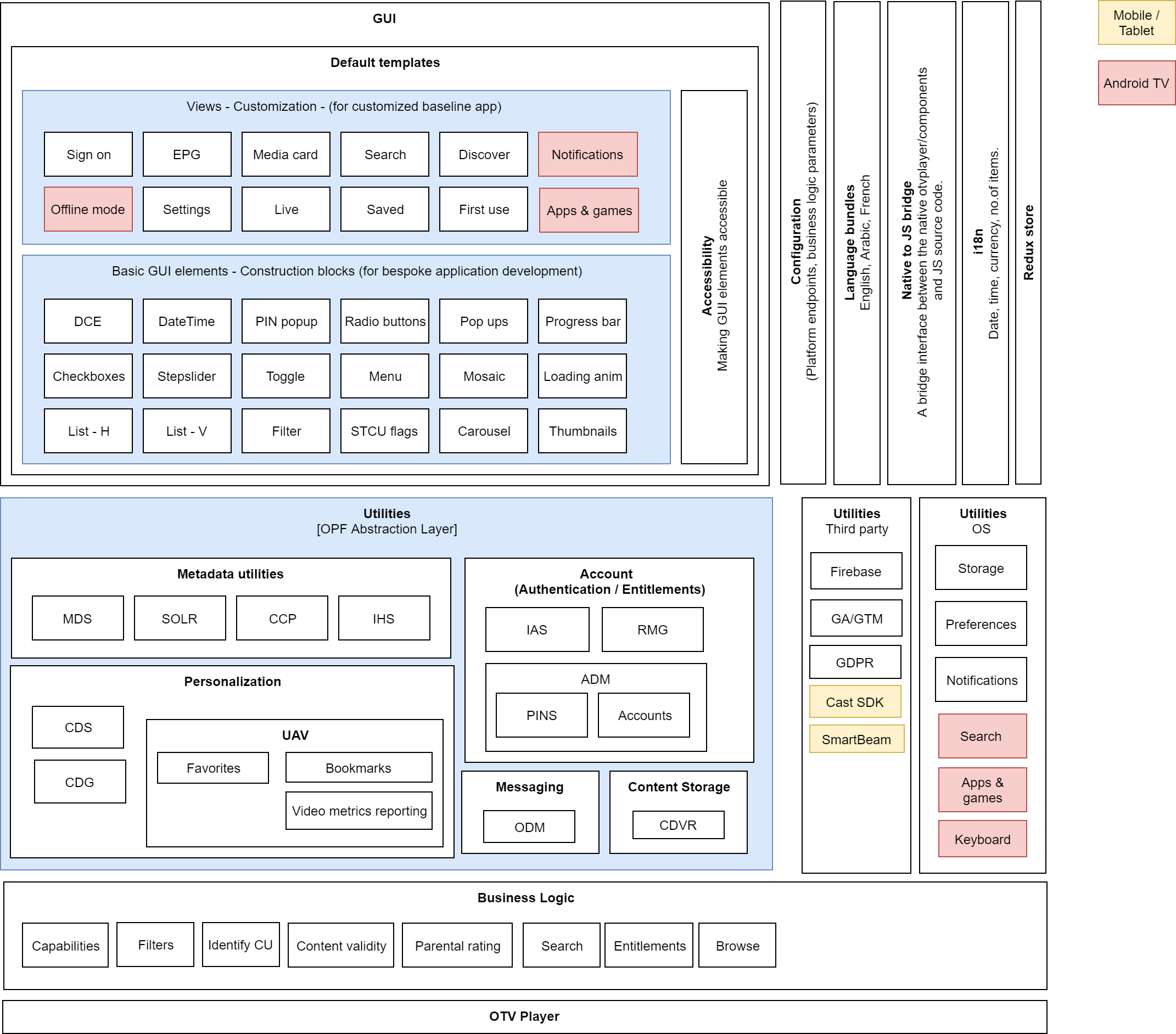
GUI
In the diagram above, the compound user interface elements are often referred to as screens or views. There are a number of UI elements within each screen. These are identified and further broken down into different smaller components. There are common elements used across the screens. In the OpenTV ION source code, you get more detail on the whereabouts of these logical structures.
|
Screen/view |
Description |
Devices - Android and iOS |
|---|---|---|
|
Sign on |
Login screen for OpenTV ION |
All |
|
EPG |
Shows live content (present, future as well as past) metadata in grid guide fashion |
All |
|
Media card |
Shows the media card for an item of content, with certain actions such as Favorite, Record, Play, Preview etc |
All |
|
Search |
Enables the user to search for content and view the search results |
All |
|
Discover |
Shows personalized content for the user based on his/her watch history, along with promoted strips from the backend |
All |
|
Settings |
Shows list of OpenTV ION-related settings such as parental control PIN, parental control settings, subscription, video resolution settings etc |
All |
|
Live |
Shows current list of live events across all channels |
All |
|
Saved |
Shows a list of user recorded or scheduled recordings |
All |
|
First use |
Shows a list of default settings which can be changed during first time sign-in to OpenTV ION app |
All |
|
Notifications |
Shows a list of system notifications |
Only for Android TV |
|
Offline mode |
Shows a minimal list of OpenTV ION app menu options when no internet is available |
Only for Android TV |
|
Apps & Games |
Shows a list of Android TV Apps and Games installed in the STB box as per Google operator tier |
Only for Android TV |
|
Basic GUI elements |
These are common components used across the screens:
|
All |
Accessibility
GUI elements are enabled for accessibility wherever it is deemed necessary and beneficial to the end users.
Configuration
App UI Skin (colors, fonts) can be customized as per operator needs. Also OPF platform end point URL can be specified in the configuration and can be bundled along with source code during app binary generation. More details can be found here.
Language bundle
All strings are localized and can be modified for supported languages - English, Arabic and French. More details can be found here.
JS to native bridge
An interface to link JS source code with native code to achieve certain functionalities within the app to meet business needs.
App state management
Each view is backed by one or more redux store (cached) metadata elements which are fetched asynchronously from relevant sources (micro services or OS internal interfaces).
Utilities
Utilities are logical groups of functionality used by the UI elements.
|
Utility name |
Description |
|---|---|
|
OVP |
A group of logic that helps to interact with micro services of OpenTV Video Platform (MDS, IAS, RMG etc):
|
|
OS |
A group of logic that helps to interact with the underlying OS and its features to be used in the GUI as needed:
Implementation is specific to each device platform - Android and iOS |
|
Thirdparty |
A group of logic that helps to interact with native OS or third party servers (non-NAGRA):
|
Business logic
There are specific filters applied to backend APIs based on user settings and operator deployment needs so that appropriate content is shown in GUI.
-
Capabilities - Catch-up content
-
Filters - e.g. number of days live metadata to show in EPG
-
Identify CU - logic to identify if catch-up is available in metadata
-
Content Validity - logic to filter valid content before presenting it to the user in GUI
-
Search - logic to filter content based on a set of rules (e.g. actor, genre, type of content - catch-up, live, etc.)
-
Entitlements - logic to show the content rights available associated with account before playback
-
Browse - logic to show a list of catch-up and on-demand content based on operator
OTV Player
A NAGRA-owned player product that has an SDK for different platforms is integrated (per platform) into the application.
Refer to OTV Player documentation for Android and iOS here.