
Encoding workflow
This is a two stage workflow, with a pre-processing job for editorial content, and encoding/packaging on technical content.
Pre-processing
The todolist is checked for Assets with NEW status by issuing a newAsset command and polling with a getToDoList request (see PES integration). Based on the status, the preprocessing job is marked as Done or Failed.
.png?cb=b578c08c65de48aa8ff32ff18f4741f8)
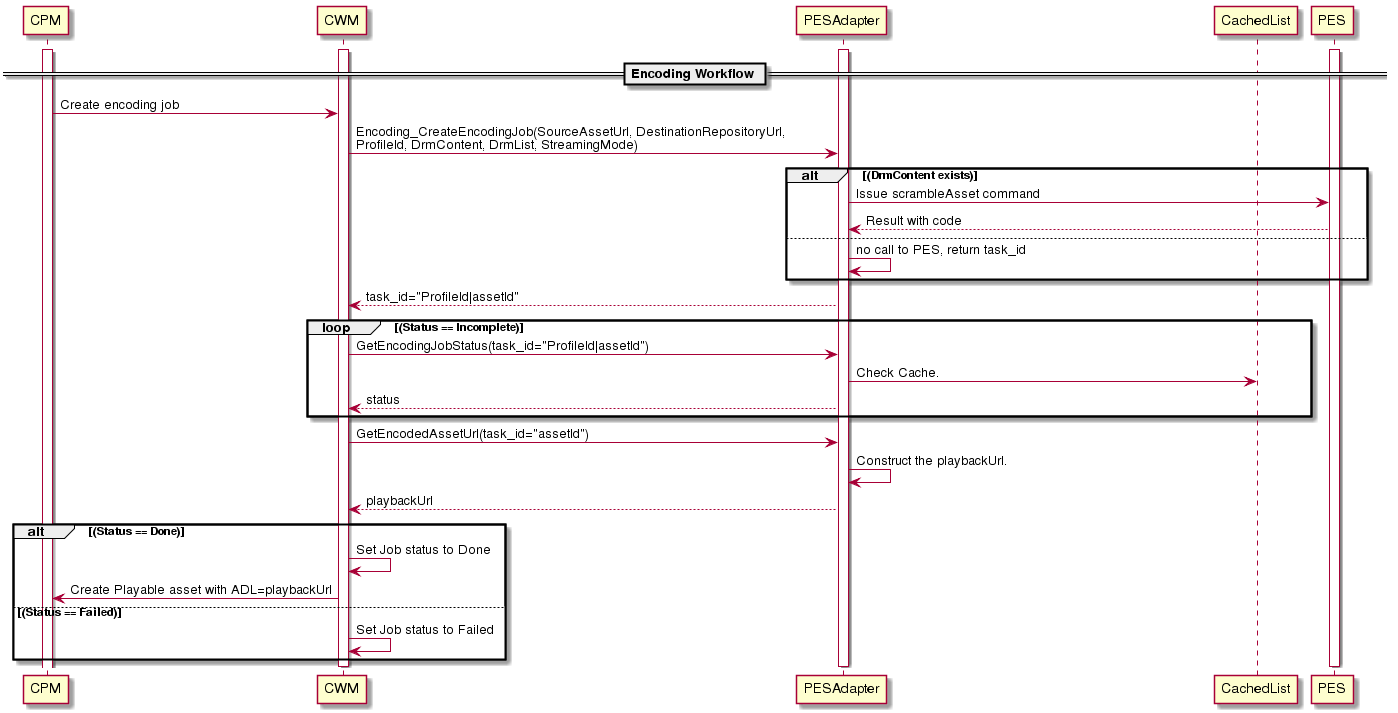
Encoding
To check for assets with SCRAMBLED status, a scrambleAsset command with the required details and a poll with getToDoList request is sent (see PES integration). Based on the status, the encoding job is marked as Done or Failed.
Purge Workflow
In CMS4 setup at foxtel has purge of source asset, encoded asset and index file.
-
Source asset purge
-
A purge profile should be linked on editorial content, so that a purge job gets generated and processed accordingly. Once the physical asset is deleted, removes the linked reference asset on editorial content.
-
The scrambleAsset command takes an optional DELETE parameter, which automatically takes care of deleting the source/clear asset after scrambling is complete.
-
-
Encoded asset and index file purge: Use CFI purge workflow
-
A purge profile with destination device should be linked to technical content, accordingly a purge job should be created/processed. Once the both the encoded and index file assets are deleted, removes the linked playable and index file assets on technical content.
-