|
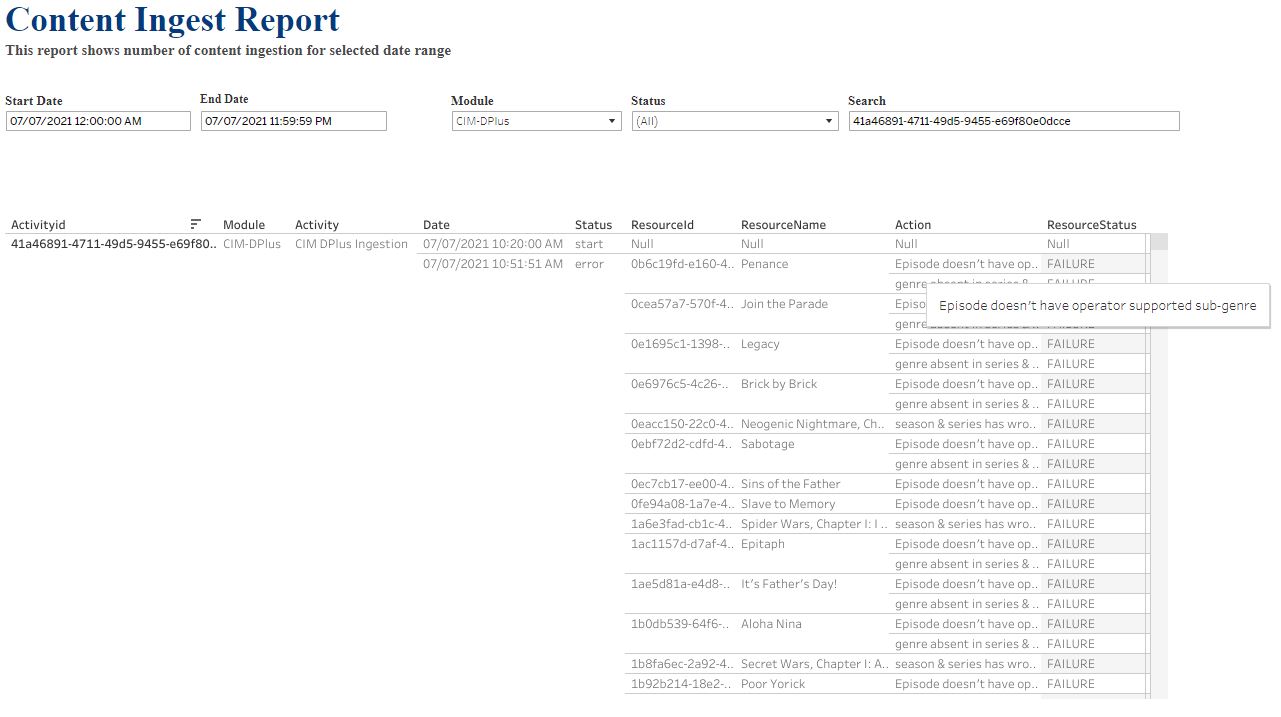
Error scenario
|
Error message (i.e., the action which appears in the report)
|
|
None of the genres in the Disney+ series metadata matches the following list of operator-supported sub-genres:
-
Action-Adventure
-
Animals & Nature
-
Animation
-
Anthology
-
Comedy
-
Documentary
-
Docuseries
-
Drama
-
Fantasy
-
Game Show / Competition
-
Musical
-
Reality
-
Romance
-
Science Fiction
-
Sports
-
Talk Show
-
Variety
|
-
The report will have the following action (error message) for this scenario:"Series doesn't have operator supported sub-genre"
-
The list of Disney+ itemIds for which this issue was encountered will appear in ResourceId and the corresponding title in ResourceName.
|
|
None of the genres in the Disney+ season metadata matches the following list of operator-supported sub-genres:
-
Action-Adventure
-
Animals & Nature
-
Animation
-
Anthology
-
Comedy
-
Documentary
-
Docuseries
-
Drama
-
Fantasy
-
Game Show / Competition
-
Musical
-
Reality
-
Romance
-
Science Fiction
-
Sports
-
Talk Show
-
Variety
|
-
The report will have the following action (error message) for this scenario:"Season doesn't have operator supported sub-genre"
-
The list of Disney+ itemIds for which this issue was encountered will appear in ResourceId and the corresponding title in ResourceName.
|
|
None of the genres in the Disney+ movie metadata matches the following list of operator-supported sub-genres:
-
Action-Adventure
-
Animals & Nature
-
Animation
-
Anthology
-
Comedy
-
Documentary
-
Docuseries
-
Drama
-
Fantasy
-
Game Show / Competition
-
Musical
-
Reality
-
Romance
-
Science Fiction
-
Sports
-
Talk Show
-
Variety
|
-
The report will have the following action (error message) for this scenario:"Movie doesn't have operator supported sub-genre"
-
The list of Disney+ itemIds for which this issue was encountered will appear in ResourceId and the corresponding title in ResourceName.
|
|
If ratings info is not available in the episode metadata, the adapter will try to get it from the corresponding series or season ratings info. If ratings info is not present in either the series and season, the adapter will discard the specific episode item from ingestion.
|
-
The report will have the following action (error message) for this scenario:"rating absent in series & season,discarded episode"
-
The list of Disney+ itemIds for which this issue was encountered will appear in ResourceId and the corresponding title in ResourceName.
-
The specific item will not be ingested.
|
|
If genre info is not present in episode metadata, the adapter will try to get it from the corresponding series or season genres info. This error occurs if none of the genres in the series or season genres info matches the following list of operator-supported sub-genres:
-
Action-Adventure
-
Animals & Nature
-
Animation
-
Anthology
-
Comedy
-
Documentary
-
Docuseries
-
Drama
-
Fantasy
-
Game Show / Competition
-
Musical
-
Reality
-
Romance
-
Science Fiction
-
Sports
-
Talk Show
-
Variety
|
-
The report will have the following action (error message) for this scenario:"episode doesn't have operator supported sub-genre"
-
The list of Disney+ itemIds for which this issue was encountered will appear in ResourceId and the corresponding title in ResourceName.
|
|
If genre info is not available in the episode metadata, the adapter will try to get it from the corresponding series or season genre info. If genres info is not present in either the series and season, the adapter will discard the specific episode item from ingestion.
|
-
The report will have the following action (error message) for this scenario:"genre absent in series and season,discarded episode"
-
The list of Disney+ itemIds for which this issue was encountered will appear in ResourceId and the corresponding title in ResourceName.
-
The specific item will not be ingested.
|
|
The item (movie/short-form/series/season/episode) does not have a locale that is supported by Business Configuration Manager (BCM) in its text metadata.
|
-
The report will have the following action (error message) for this scenario:"texts without locale info found,discarded item"
-
The list of Disney+ itemIds for which this issue was encountered will appear in ResourceId and the corresponding title in ResourceName.
-
The specific item will not be ingested.
|
|
The item (movie/short-form/series/season/episode) does not have a preferred rating agency in the rating metadata.
For example, if MDA is the preferred operator-supported rating agency and the same rating agency is not available in the Disney+ rating's system info, the adapter will report this error message.
|
-
The report will have the following action (error message) for this scenario:"Preferred rating system agency missed from D+ info"
-
The list of Disney+ itemIds for which this issue was encountered will appear in ResourceId and the corresponding title in ResourceName.
|
|
The credit role for the item (movie/short-form/series/season/episode) does not match with the Disney+ adapter's mapping.
For example, Disney+ and Platform supported role mapping:
{"starring": "Actors", "director": "Directors", "creator": "Writers"}
|
-
The report will have the following action (error message) for this scenario:"Role not mapped for Item's credits info"
-
The list of Disney+ itemIds for which this issue was encountered will appear in ResourceId and the corresponding title in ResourceName.
|
|
A field is empty or no info is provided for the item (movie/short-form/series/season/episode) in the Disney+ metadata.
For example, in the Disney+ metadata, the "credits" info is empty, i.e., "credits" = [].
|
-
The report will have the following action (error message) for this scenario:"Disney+ metadata with empty info"
-
The list of Disney+ itemIds for which this issue was encountered will appear in ResourceId and the corresponding title in ResourceName.
|
|
audienceType is not available in the availability metadata for the item (movie/short-form/series/season/episode) and the content is already expired.
|
-
The report will have the following action (error message) for this scenario:"No AudienceType and expired too,discarded item"
-
The list of Disney+ itemIds for which this issue was encountered will appear in ResourceId and the corresponding title in ResourceName.
-
The specific item will not be ingested.
|
|
Both audienceType and action are not available in the availability metadata for the item (movie/short-form/series/season/episode).
|
-
The report will have the following action (error message) for this scenario:"No Action field in Availability metadata info"
-
The list of Disney+ itemIds for which this issue was encountered will appear in ResourceId and the corresponding title in ResourceName.
|
|
The item (movie/short-form/series/season/episode) is expired, that is, the availability "expires" date and time stamp info is older than current date and time.
|
-
The report will have the following action (error message) for this scenario:
<contentType> item is expired, discard item
where contentType is movie/short-form/series/season/episode.
-
The list of Disney+ itemIds for which this issue was encountered will appear in ResourceId and the corresponding title in ResourceName.
-
The specific item will not be ingested.
|
|
No data can used from the availability object.
|
-
The report will have the following action (error message) for this scenario:"Inaccurate Availability metadata info"
-
The list of Disney+ itemIds for which this issue was encountered will appear in ResourceId and the corresponding title in ResourceName.
|
|
The BCM locale configuration is empty.
|
-
The report will have the following action (error message) for this scenario:"Operator BCM locale not set,ingestion aborted"
-
In this case, ResourceId and ResourceName are "" (empty) and the whole ingestion process is aborted.
|
|
The operator-configured locale does not match a Disney+ Adapter-supported locale.
For example, if the fr_FR and es_LA BCM locales are configured on the operator side, but the Disney+ adapter's mapping is as follows:
{ "en-GB": "en_GB", "en-US": "en_US", "zh-SG": "zh_SG", "en-AU": "en_AU", "es-CO": "es_CO", "ar": "ar_AR"}
then ingestion will be aborted.
The following adapter mapping is required to support these locales (additions in bold):
{
"en-GB": "en_GB",
"en-US": "en_US",
"zh-SG": "zh_SG",
"fr-FR": "fr_FR",
"es-419": "es_LA",
"en-AU": "en_AU",
"es-CO": "es_CO",
"ar": "ar_AR"
}
|
-
The report will have the following action (error message) for this scenario:"Operator & D+ locale mismatch,ingestion aborted"
-
In this case, ResourceId and ResourceName are "" (empty) and the whole ingestion process is aborted.
|
|
The images key in the Disney+ metadata has no info e.g. "images" : []
|
-
The report will have the following action (error message) for this scenario:"no images info in metadata,discarded item"
-
The list of Disney+ itemIds for which this issue was encountered will appear in ResourceId and the corresponding title in ResourceName.
|
|
The action key in the Disney+ metadata deep links has no details value.
|
-
The report will have the following action (error message) for this scenario:"no details action for deeplinks,discarded item"
-
The list of Disney+ itemIds for which this issue was encountered will appear in ResourceId and the corresponding title in ResourceName.
|
|
The action key in the Disney+ metadata deep links has no playMedia value.
|
-
The report will have the following action (error message) for this scenario:"no playMedia action for deeplinks,discarded item"
-
The list of Disney+ itemIds for which this issue was encountered will appear in ResourceId and the corresponding title in ResourceName.
|
|
An episode's corresponding series and season have a mandatory field entry missing, and the episode is discarded for ingestion.
The exact issue can be found by checking the mapped series and season data for the episode.
|
-
The report will have the following action (error message) for this scenario:"season & series has wrong info,discarded episode"
-
The list of Disney+ itemIds for which this issue was encountered will appear in ResourceId and the corresponding title in ResourceName.
|
|
There is a new or unknown response when querying the Disney+ metadata server, which the adapter cannot process.
|
-
The report will have the following action (error message) for this scenario:"issue in handling D+ metadata,ingestion aborted"
-
In this case, the whole ingestion process is aborted.
ResourceId is the URL adapter module requested to query the Disney+ metadata from the server.
ResourceName is <contentType>_<action>.
Possible values for <contentType> is movie/short-form/series/season/episode and <action> is added/deleted.
If the URL length is more than 150 characters, it will truncate at the end with <url>.
|
|
There is an HTTP connection error when retrieving data from Disney +. For example, the server is out of service or not responding.
|
-
The report will have the following action (error message) for this scenario:"D+ HTTP request failed,ingestion aborted"
-
In this case, the whole ingestion process will be aborted.
ResourceId is the URL adapter module requested to query the Disney+ metadata from the server.
ResourceName is <contentType>_<action>.
Possible values for <contentType> is movie/short-form/series/season/episode and <action> is added/deleted.
|
|
There are unhandled technical or error messages from the platform.
|
-
The report will have the following action (error message) for this scenario:"invalid data from D+ server,ingestion aborted"
-
In this case, the whole ingestion process is aborted.
ResourceId is the URL adapter module requested to query the Disney+ metadata from the server.
ResourceName is <contentType>_<action>.
Possible values for <contentType> is movie/short-form/series/season/episode and <action> is added/deleted.
|
|
An HTTP error occurred during OPF node creation.
|
ResourceId is the URL in this format <url>/cpm/content/v1/nodes
ResourceName for example DPlus_Node
In the notification message "name": "DPlus_Node", DPus_Node is dynamic and read from the configuration file.
|
|
An internal error occurred; for example, during data transfer between modules.
|
ResourceId = Ingester
ResourceName = 0
|
|
Requests not received by server when posting bulk data to the OPF3 server,
|
ResourceId = http://http-router/< cpm_api_endpoint>where cpm_api_endpoint is the CPM endpoint that handled the request.
ResourceName = contentGroupSet
The supported values for ResourceName are:
|
|
One or many itemIds have invalid references or data when sending bulk requests to update the Disney+ metadata info in the OPF3 server.
|
The Disney+ itemIds which experienced this issue will be present in the ResourceId and corresponding content set in ResourceName.
The supported values for ResourceName are:
|
|
The server responded with an error message or empty response when sending bulk data to the OPF3 server.
|
ResourceId = 0
ResourceName = contentGroupSet
Supported values for ResourceName are:
-
contentGroupSet → content group bulk payload
-
editorialContentSet → editorial content bulk payload
-
technicalContentSet → technical content bulk payload
-
contentPublishingWindowSet → content publishing window bulk payload
-
deepLinkSet → deeplinks bulk payload
|
|
A request did not reach the server, or the server could not send a response to the client.
|
ResourceName = DPlus_123456789 where DPlus is the provider Id and 123456789 is Disney+ itemId.
ResourceId = http://http-router/< cpm_api_endpoint> where cpm_api_endpoint is the CPM endpoint that handled the request.
|
|
There is an unknown server response not handled in the adapter.
|
ResourceName = DPlus_123456789 where DPlus is the provider Id and 123456789 is Disney+ itemId.
ResourceId = http://http-router/< cpm_api_endpoint> where cpm_api_endpoint is the CPM endpoint that handled the request.
|
|
There is an HTTP request error when deleting data from the OPF server.
|
ResourceName = DPlus_123456789 where DPlus is the provider Id and 123456789 is Disney+ itemId.
ResourceId = http://http-router/< cpm_api_endpoint> where cpm_api_endpoint is the CPM endpoint that handled the request.
|
|
The business profile is empty.
|
-
The report will have the following action (error message) for this scenario:"No Business profile configured,Ingestion aborted"
-
In this case, the whole ingestion process is aborted.
ResourceName = check_profiles
ResourceId = http://http-router/< cpm_api_endpoint> where cpm_api_endpoint is the CPM endpoint that handled the request.
|
|
There is an unhandled error when fetching the business profile.
|
-
The report will have the following action (error message) for this scenario:"Fetch business profile Error,Ingestion aborted"
-
In this case, the whole ingestion process is aborted.
ResourceName = check_profiles
ResourceId = http://http-router/< cpm_api_endpoint> where cpm_api_endpoint is the CPM endpoint that handled the request.
|
|
The CPM commercial product is not configured.
|
-
The report will have the following action (error message) for this scenario:"No CPM product configured,Ingestion Aborted"
-
In this case, the whole ingestion process is aborted.
ResourceName = check_products
ResourceId = http://http-router/< cpm_api_endpoint> where cpm_api_endpoint is the CPM endpoint that handled the request.
|
|
There is an unhandled error when fetching the CPM commercial product.
|
-
The report will have the following action (error message) for this scenario:"Fetching CPM product Error,Ingestion Aborted"
-
In this case, the whole ingestion process is aborted.
ResourceName = check_products
ResourceId = http://http-router/< cpm_api_endpoint> where cpm_api_endpoint is the CPM endpoint that handled the request.
|
|
The CPM product link is empty.
|
-
The report will have the following action (error message) for this scenario:"CPM product link is empty,Ingestion aborted"
-
In this case, the whole ingestion process is aborted.
ResourceName = check_product_links
ResourceId = http://http-router/< cpm_api_endpoint> where cpm_api_endpoint is the CPM endpoint that handled the request.
|
|
There is an unhandled error when fetching the CPM product link.
|
-
The report will have the following action (error message) for this scenario:"Fetch CPM Product Links Error,Ingestion aborted"
-
In this case, the whole ingestion process is aborted.
ResourceName = check_product_links
ResourceId = http://http-router/< cpm_api_endpoint> where cpm_api_endpoint is the CPM endpoint that handled the request.
|
|
The CPM business rule is empty.
|
-
The report will have the following action (error message) for this scenario:"Empty CPM Business Rule,Ingestion Aborted"
-
In this case, the whole ingestion process is aborted.
ResourceName = check_cpm_business_rules_availability
ResourceId = http://http-router/< cpm_api_endpoint> where cpm_api_endpoint is the CPM endpoint that handled the request.
|
|
There is an unhandled error while fetching the CPM business rule.
|
-
The report will have the following action (error message) for this scenario:"Fetching Business Rule Error,Ingestion Aborted"
-
In this case, the whole ingestion process is aborted.
ResourceName = check_cpm_business_rules_availability
ResourceId = http://http-router/< cpm_api_endpoint> where cpm_api_endpoint is the CPM endpoint that handled the request.
|