Overview
You can target a page (template) to a segment so that only certain users can see it.
For example, you can set up:
-
A page that only users who are subscribed to a particular product can see
-
A page that is only available on managed set-top-boxes, but not on mobile
Enabling segment targeting for a page
Prerequisites:
-
The page (template) already exists.
-
The segment already exists
To enable segment targeting for an existing page:
-
From the OpCon homepage, click Rails Builder.
-
Find the page (template) that you want target to a particular segment.
-
Click

-
Check the checkbox for each segment that the template should target. (You can select multiple segments.)
-
Click Apply.
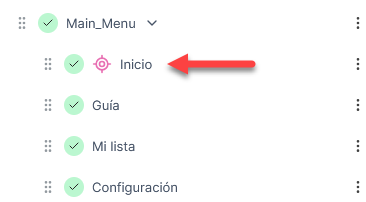
A target icon indicates that the template is now targeted to one or more segments: