
Description
The goal of this interface is to purge an asset on the destination CDN. As part of purge workflow, the CWM constructs a request message containing “DestinationAsset” and “MetaData”. Response message consists of a unique “TaskId” of the operation.
Request
PurgeAsset Xsd
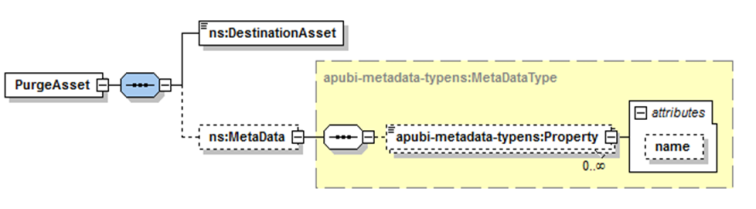
Parameters
|
Name |
Type |
Description |
|---|---|---|
|
DestinationAsset |
xs:string |
URI/Id of the destination repository from where the asset will be purged.
Or if the DestinationAsset is an identifier which points the asset on the CDN, e.g. movie_01072015102030 |
|
MetaData |
xs:MetaDataType |
See MetaData details. |
Response
PurgeAssetResponse Xsd

Parameters
|
Name |
Type |
Description |
|
TaskId |
xs:string |
ID of the publishing job as created by the publishing system.
|
Fault
A third-party publishing server may throw any error which occurred during the execution of purge job as a fault message. Below are a few examples for failure cases:
-
Destination asset URI not accessible
-
Not able to delete Destination asset
-
Any internal error which occurred during purge job execution
See Fault management for a fault response sample.
Samples
Use case
Request
For a single file
<soap:Envelope xmlns:soap="http://schemas.xmlsoap.org/soap/envelope/">
    <soap:Body>
        <PurgeAsset xmlns="wfm:APUBI/v1/schemas" xmlns:ns2="wfm:/APUBI/v1/schemas">
            <DestinationAsset>Test_Encryption_GenericAssetContent_01/TestAsset_1080p.mp4
</DestinationAsset>
        </PurgeAsset>
    </soap:Body>
</soap:Envelope>
For a directory
<soap:Envelope xmlns:soap="http://schemas.xmlsoap.org/soap/envelope/">
    <soap:Body>
        <PurgeAsset xmlns="wfm:APUBI/v1/schemas" xmlns:ns2="wfm:/APUBI/v1/schemas">
            <DestinationAsset>Test_Encryption_GenericAssetContent_01/ </DestinationAsset>
        </PurgeAsset>
    </soap:Body>
</soap:Envelope>
Response
Success scenario
<soapenv:Envelope xmlns:soapenv="http://schemas.xmlsoap.org/soap/envelope/" xmlns:ns="wfm:APUBI/v1/schemas">
    <soapenv:Header/>
    <soapenv:Body>
        <ns:PurgeAssetResponse>
            <ns:TaskId>110F8400-E29B-11D4-A716-446655440</ns:TaskId>
        </ns:PurgeAssetResponse>
    </soapenv:Body>
</soapenv:Envelope>
Failure scenario
<soapenv:Envelope xmlns:soapenv="http://schemas.xmlsoap.org/soap/envelope/" xmlns:ns="wfm:APUBI/v1/schemas">
    <soapenv:Header/>
    <soapenv:Body>
        <soapenv:Fault>
            <faultcode>env:Server</faultcode>
            <faultstring>Destination asset does not exist </faultstring>
            <detail>
                <ns2:ExceptionWS xmlns:ns2="wfm:APUBI/v1/schemas">
                    <message> Destination asset does not exist </message>
                </ns2:ExceptionWS>
            </detail>
        </soapenv:Fault>
    </soapenv:Body>
</soapenv:Envelope>
The NAGRA Workflow Manager (WFM) expects the success response to be in the following format with a 200 OK HTTP status code. Fault messages should be returned with an HTTP error response code, for example, 400, 500, etc.