What page hierarchy does ION expect?
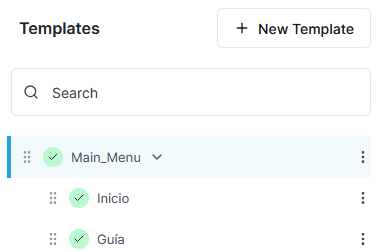
ION expects a single top-level page (template) with all the other pages as its immediate children.
By default, it expects the top-level page to be named Main_Menu, but this can be configured by NAGRAVISION on a per-deployment basis.
For example:
How do I add a new page so that it appears in the ION menu?
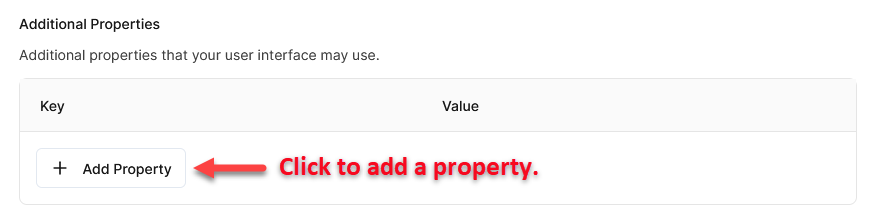
There are two key/value pairs (Additional Properties in the layout) that you need to add to each page’s layout to ensure that ION includes it in its menu:
-
screenId– each page must have a unique screen ID. ION core pages have IDs between 1 and 31. Other pages must use an ID greater than 1000. -
routeName– for ION Desktop (web) only, you must specify a route name. This can be any string value.
See Individual page properties in ION-specific configuration properties for details.
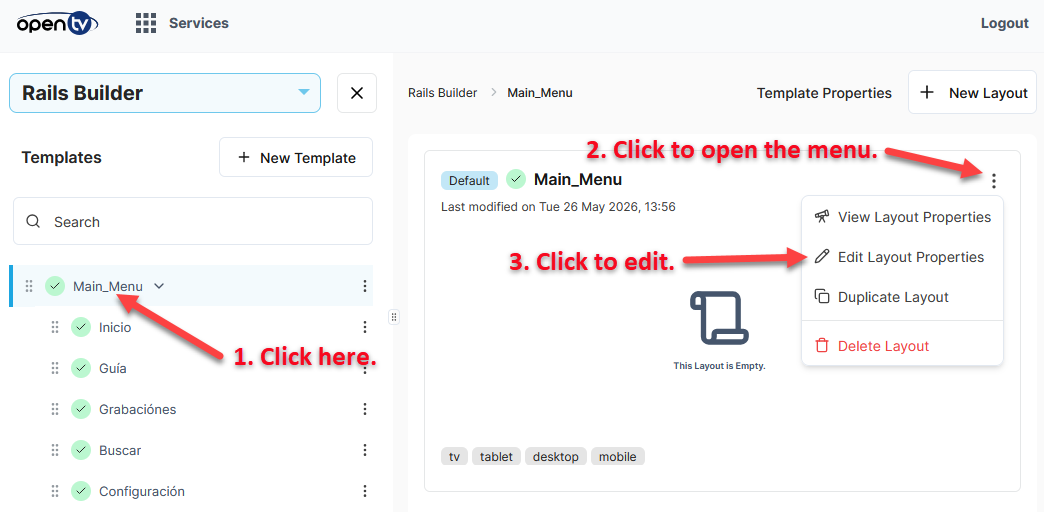
In shared system deployments (where there can be multiple tenants), you must select the correct tenant in the template.
In the left pane, click
How do I enable cinematic view for a page?
In cinematic view, the image for the selected item is displayed as the page background.
To enable cinematic mode, set one of the following in the layout’s Additional Properties for the page (template):
-
enableCinematicForAllItems– set totrueto enable cinematic view for all items on the page. -
enableCinematicForFirstRow– set totrueto enable cinematic view for only the items in the first rail.
How do I change the look and feel of the ION app?
To change the look and feel (colours, rounded corners, etc.), add the required key/value pairs to Additional Properties in the layout for the top-level page (template).
The available parameters are listed in Top-level page properties in ION-specific configuration properties.
Why is the content that I added in Rails Builder not appearing in ION?
If content that you added in Rails Builder is not appearing in ION, there are a number of things you should check:
-
Is the whole rail missing in ION? If so, check if:
-
The rail is scheduled for a time in the past or in the future.
-
The rail is part of an experiment (A/B test).
-
The rail is targeted to a specific segment.
-
The rail is part of a layout that targets a device type that is different from the device type that ION is running on.
For example, the rail is part of a TV-specific layout and ION is running on a mobile device.
-
-
Is a specific content missing in ION? If so, check if:
-
The content’s validity date range is in the future or the past. That is, is it not yet valid? Or has its validity period expired?
-
The asset does has a technical content that matches what the device needs.
For example, there is only an HLS technical content and the device running ION is an Android device that needs a DASH technical content. -
The content is available in MDS / Metamorph / Content Delivery.
Sometimes, newly-ingested content is visible in Rails Builder, but is not yet available in MDS / Metamorph / Content Delivery.
Alternatively, one of these services may be down.
Check the logs or ask your NAGRAVISION representative to investigate.
-
-
Is the missing content a live event? If so, check if:
-
The user account that is logged into ION is subscribed to the channel that the event belongs to.
-