
Overview
The OPF Messaging Service supports a number of use cases, including both automated and operator-initiated scenarios.
It uses a combination of:
-
Standard third-party cloud-based services – Google Firebase Cloud Messaging (FCM) and Amazon Device Messaging (ADM), both reached through Amazon Simple Notification Service (SNS), and AWS IoT Core
-
Standard client library implementations
This enables notifications to be sent to various types of devices (iOS, Android, FireTV, and Smart TV (Tizen and webOS) devices).
The following diagram shows the main components involved in messaging and the primary interfaces between them:
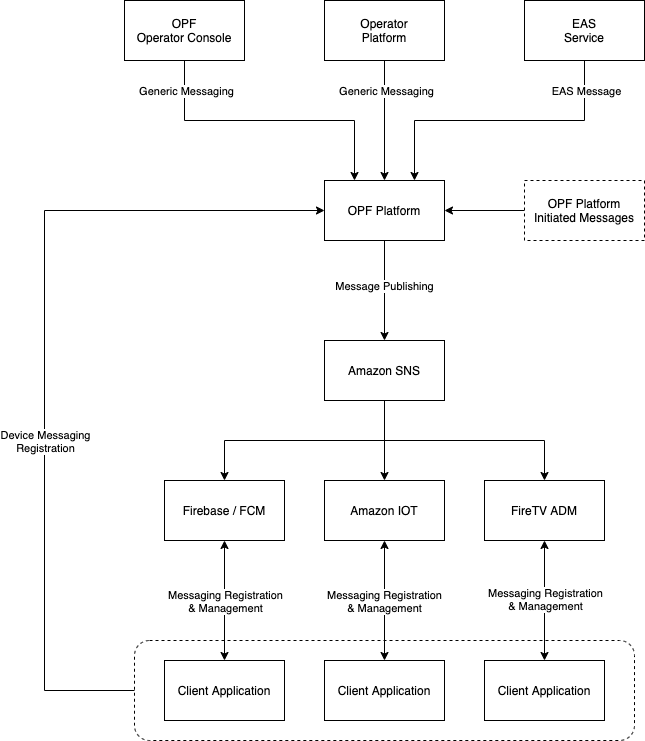
The OPF Messaging Service consists of:
-
Open Device Messaging (ODM) – handles registration of devices with DMM. It does this automatically – when a client app calls ODM to register the device, ODM automatically registers it with DMM.
-
Device Messaging Manager (DMM) – handles creation and management of topics, subscribing devices to topics, and sending notifications to topics or devices.
-
The Message Management section in Operator Console – allows you to manage topics and send messages. See Message Management.
OpenTV Platform uses this service itself to notify clients of metadata changes (such as EPG schedule changes). See Metadata change alerts.
Supported messaging use cases
|
Use case |
Description |
Generating source |
Target |
|---|---|---|---|
|
EPG updates |
EPG metadata updates |
Automatically generated by OPF (by MDS, Metamorph, or both, depending on how the platform is configured) |
All devices subscribed to the metadata change topic ( |
|
Entitlement change notification |
Notification as a result of an entitlement change (add/delete/update) to an account in OPF (RMG) |
Automatically generated by OPF, if enabled for the entitlement (see Automatically-generated messages, below) |
The device that the entitlement is for or, if it isn't for a specific device, all the devices in the account |
|
Emergency Alert System (EAS) alert (US only) |
Regulatory emergency alert message |
EAS Platform integrated via OPF-DMM interface |
All devices within an account that matches the specified EAS FIPS code |
|
General notification |
Free form message, generally used for marketing or general notices / information |
Operator platform via OPF-DMM interface Operator via Operator Console Messaging screen |
One of:
|
Not all use cases are relevant or configured in every deployment.
Message targeting
OPF messaging supports multiple routes for message targeting:
-
Targeting a specific device
-
Targeting all devices that are registered to a specific topic
-
Targeting all devices (by sending a message to the
GlobalTopicForAllDevicestopic that all devices are registered to) -
Targeting all devices that belong to a specific account
-
A specific user profile
Message topics
Messaging is organised around the concept of topics. Once a device is registered with the service, you can subscribe it to any of the topics that have been defined.
There is a default topic (called GlobalTopicForAllDevices) to which all devices are automatically subscribed.
You can also create any number of ad hoc topics and subscribe devices to them as required.
When you send a message to a topic, the message is sent to all the devices that are subscribed to the topic.
You can create topics:
-
Via a DMM API call – see:
-
In Operator Console (OpCon) – see Create topics
Automatic topic creation and subscription
OpenTV Platform allows you to create segments to group users by things like interests, device types, and so on. (See Segment targeting.)
When a segment is created, OpenTV Platform automatically:
-
Creates a messaging topic for the segment
-
Subscribes the relevant devices to the topic according to the segments that apply to each user profile
For segments that are based on device profile criteria, OpenTV Platform only subscribes a device to a segment when it matches the required device profile.
It also automatically subscribes and unsubscribes devices to topics when:
-
A segment is added to a user profile
-
A segment is removed from a user profile
-
A new device is added to an account
-
A device is removed from an account
-
A segment’s definition changes
You cannot manually manage the devices that are subscribed to a segment-based topic.
Message format
Automatically-generated messages
There are two types of messages that are automatically generated by OPF:
-
Entitlement change notification
-
EPG updates
Each type of message has its own specific format, which cannot be changed.
Entitlement change notifications are sent only for entitlements whose clientScope is ALWAYS. You can set clientScope, and clientUrgency (which the client receives as the message priority: NONE, LOW, or HIGH), on each entitlement when you create it through the RMG API. You can also change clientScope when you update an entitlement. If an entitlement doesn't have a clientScope, the platform default is used. Unless it was changed when the platform was deployed, the default is NONE: no notifications are sent.
EPG updates are sent by Metadata Server (MDS), Metamorph, or both, depending on how the platform is configured. The two send different message formats. They are sent to the metadata change topic, so devices must be subscribed to that topic – see Metadata change alerts.
Client applications are responsible for interpreting these messages and processing them accordingly.
General notifications
For general notifications that you (the operator) initiate, you decide what the message contains. To make use of the client behaviours that NAGRAVISION recommends (opening a product, showing an image, and so on), use the fields described in Message formats.
Rules for all messages
DMM delivers the same message to every device, whichever messaging service the device uses (FCM, ADM, or AWS IoT Core). For a message to work with all of them:
-
Use only string values in
data. FCM and ADM accept only strings indata, so send numbers as strings, for example"displayTime":"10". -
Put additional fields in
data.bodyas a JSON string.data.bodymust be a string. To include fields such asproductIdorimageUrl, write them as a JSON object and send that object as the string value ofdata.body. -
Keep the message on a single line. DMM rejects a message that contains a line break.
-
Keep the message small. FCM accepts up to 4 KB and ADM up to 6 KB. If a topic includes both kinds of device, the smaller limit applies.
Sending a notification via a DMM API call
You can send a message to:
-
A single device – see Sending a message to a specific device
-
All devices – see Sending a message to all devices
-
All the devices subscribed to a topic – see Sending a message to all devices subscribed to a topic
-
All the devices registered to an account, or a specific user profile – see Sending a message to an account or user profile
The request is the same for all of them: an envelope object, which DMM uses, and a message, which is delivered to the devices. message is a string that contains the message JSON. The pages above give the fields and a worked example.
Sending a notification via OpCon
When you publish a message in OpCon, OpCon builds the message for you from the following fields:
-
Event Type – selected from a list. The value is sent to the client as
data.referenceType, so choose the type that the client expects (for example,PROMOTION). The list is set up when OpCon is deployed. -
Message Title (free text, up to 100 characters) – sent as both
notification.titleanddata.title -
Message Body (free text) – sent as both
notification.bodyanddata.body. It can be plain text or a JSON object. -
Message Expiration (date picker)
For example, publishing a message with the event type NOTIFICATION, the title “Weekend movies”, and the body “New films this weekend” sends this message:
{
  "notification": {
    "body": "New films this weekend",
    "title": "Weekend movies"
  },
  "data": {
    "body": "New films this weekend",
    "title": "Weekend movies",
    "referenceType": "NOTIFICATION"
  }
}
Because OpCon always includes a notification section, devices show the message as a system notification (see Client processing of messages, below). If the body is a JSON object, that JSON is also what the notification shows.
See Publish messages in the OpCon documentation for the procedure.
Message TTL/expiry
Every message is published with a time to live (TTL) / expiry date and time, which determines how long the message is available through the messaging services that are used to deliver the message to clients.
This is set as follows:
-
Via a DMM API call – in
envelope.expiration, in seconds -
In OpCon – in the Message Expiration date picker when sending a message
Client processing of messages
Client applications are expected to process the messages that they receive and react accordingly, as explained in the following table:
|
Use case |
Client action |
|---|---|
|
EPG update |
Update EPG metadata accordingly, introducing appropriate jitter to minimise peak loading and also utilising cache management to take advantage of cached responses. |
|
Entitlement change notification |
Refresh the cached entitlements. The notification identifies the account and product, but not what changed, so the client should get the current entitlements from the platform. |
|
Emergency Alert Sytem (EAS) alert (US only) |
Tune to the indicated channel and/or display information as dictated by the message and EAS standard. See Emergency Alert System (EAS) integration. |
|
General notification |
Defined on per deployment basis – the nominal use case would be to display a message with either an automatic “clear from screen” or await user interaction. |
See Handling messages received from OpenTV Platform in the Client integration guide.
On devices that use Firebase (iOS and Android), if a message includes a notification section and arrives while the client application is in the background or not running, the operating system displays the notification itself. The client application receives the data section only if the user taps the notification. If the user dismisses it, the application never receives the message.
Bear this in mind when you decide whether to include a notification section. Sending the same message twice (once with a notification section and once without) doesn't solve this reliably: the platform adds no message ID that a client could use to discard the duplicate, and iOS may delay or drop a message that has no notification section.
Prerequisites
Google Firebase setup
Messaging uses Google Firebase. You must set up the Google Firebase instance so that it belongs to you and so that you have access to Firebase Analytics. See Setting up Google Firebase.
Registering devices with Firebase, Amazon Device Messaging, or AWS IoT Core
Before a device registers with ODM, it must register with Firebase, Amazon Device Messaging, or AWS IoT Core, depending on the type of device:
-
iOS and Android devices must register with Firebase.
-
Amazon (that is, FireTV) devices must register with Amazon Device Messaging.
-
Tizen and webOS Smart TVs must register with AWS IoT Core.
When a device registers with one of these services, it will receive a token. It must pass this token to Open Device Messaging (ODM) when registering with it.
After a session ends or the device logs out, it will need to refresh this token and call ODM again with the new token.
Devices that register with AWS IoT Core (that is, webOS and Tizen Smart TVs) should only stay connected to IoT when they are in the foreground. They should disconnect when backgrounded.
Failure to do so will result in increased AWS charges.
Specifying the messaging platform at first-time sign-on
When a device signs on, it must provide device details. These details include the message platform that it uses. See deviceInformation.msgPlatform in the table in First time and n-th time sign on.
Supported actions
The following actions are supported:
-
Getting all the topics that a device is subscribed to -
Creating a topic without subscribing devices to it -
Creating a topic and subscribing devices to it -
Subscribing and unsubscribing devices to a topic -
Updating the details of a topic -
Deleting a topic -
Getting all topics -
Getting all devices that are subscribed to a topic -
Getting all devices -
Sending a message to a specific device -
Sending a message to all devices -
Sending a message to all devices subscribed to a topic -
Sending a message to an account or user profile
Note that all of the DMM endpoints used in these use cases are OPERATOR endpoints – they cannot and should not be called from a client application.
The Registering a device and Unregistering a device use cases use ODM and IAS endpoints that are specifically for client applications.
Message length
The messaging services limit the size of the whole message: FCM to 4 KB and ADM to 6 KB.
Maximum message length depends on the device, where the notification is displayed (that is, on the lock screen or in the notification centre/drawer), and the device orientation.
Please refer to device manufacturers' and the relevant OS documentation for specific limits.
Limitations
-
You are responsible for handling the language of notifications that you send. OpenTV Platform does not have an automated mechanism to select the message language based on the device’s language settings.
-
Currently, no provision/API is available in OpenTV Platform to unregister a device and to stop receiving notifications. This means that a device will continue to get notifications even after the app has been uninstalled.
-
OpenTV Platform does not automatically purge device registrations.
See also
-
Handling messages received from OpenTV Platform in the Client integration guide
-
Message Management in the OpCon documentation