
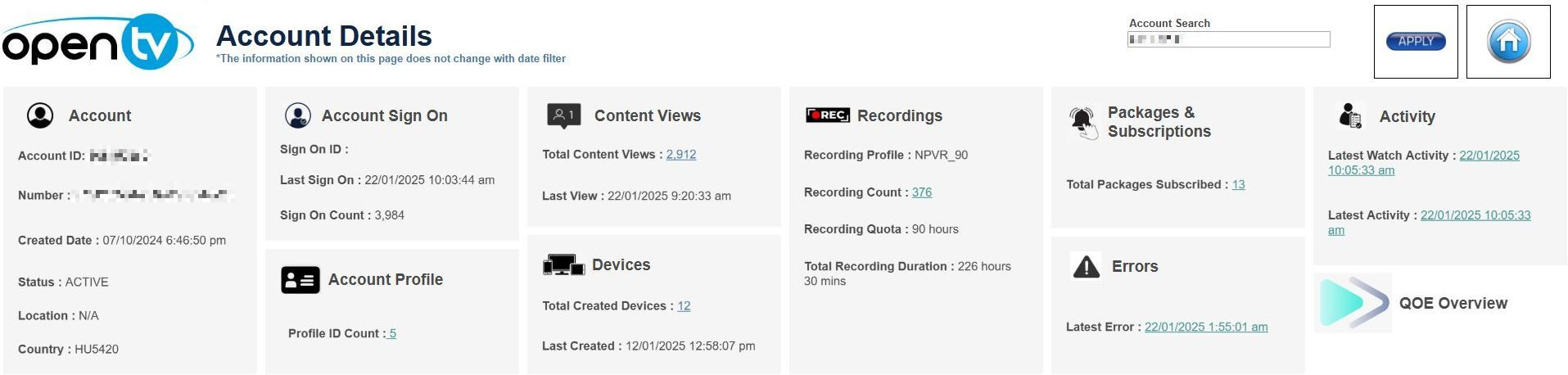
This page shows details for a specific account. There is no date filter, so the page shows a summary of information since the account became active. Users can either navigate to this page directly or by drilling down from the Overview page.
The top right of the page shows an Account Search box. If drilling down from the Overview page, the box contains the selected Account ID. Otherwise, entering a valid Account ID then clicking Apply loads the data.
Clicking the Home icon button to the right returns users to the Overview page.
Below the Account Search box, the report shows sheets for Account, Account Sign On, Account Profile, Content Views, Devices, Recordings, Packages & Subscriptions, Errors, Activity and a button link to the QoE Overview page. Single-clicking any information underlined in blue allows users to drill down to the relevant pages which give additional details. The mouseover tooltips on each sheet give further information.
